

From Prompt to Video in 2026: The Complete Guide to Remotion Agent Skills with Claude Code
If you're a developer automating dashboard reports, a marketer scaling product demos, or an agency shipping localized video campaigns, you're facing a real challenge: producing high-volume video content without hiring an editing team or sacrificing quality.
You need more than just a code framework—you need a proven workflow that delivers both automation and polish. This same challenge appears across modern short-form and platform-specific video workflows, especially as teams try to keep pace with algorithm-driven distribution and engagement strategies.
This guide gives you the complete solution: how to install Remotion Agent Skills with one command, the prompt-to-video workflow that replaces timeline editing, and how NemoVideo acts as your final polish layer—adding captions, platform formatting, and viral hooks to turn code-generated videos into scroll-stopping content.
What Are Remotion Agent Skills
Remotion turns video creation into a coding task using React. Remotion Agent Skills are the "instruction manual" you install into Claude Code so it understands how to write that code correctly.
Without these skills, Claude struggles with Remotion's patterns—it might try using web animations that break during rendering or miscalculate scene timing.With the skills installed (via the Model Context Protocol), Claude gains a mental model of frames, scenes, and component logic — similar to how modern AI video frameworks define structure before creative execution.
Three things made this practical in 2026
AI coding assistants got production-ready. Claude Code now generates complete video components from natural language prompts.
Remotion matured. It's now an open-source React library that makes video creation dynamic, scalable, and easily automated.
Agent Skills bridged the gap. Without skills, Claude might generate buggy or incorrect Remotion code.
What Agent Skills add on top of vanilla Remotion
When you run
npx skills add remotion-dev/skillsComponent architecture — How to structure
,<Composition>
,<Sequence>
properly<AbsoluteFill>Animation patterns — When to use
vsinterpolate()
, timing logic, sync strategiesspring()Common effects — Pre-tested intros, transitions, text reveals that render correctly
Performance optimization — Project structure that avoids memory issues and dropped frames
This structured approach mirrors how template-driven social video systems reduce errors and speed up production, particularly when teams later adapt outputs into TikTok or Reels formats.
Best for: Developers automating data reports, growth teams testing ad variations, and technical creators building "video factories".
Even with clean, render-safe code, most teams still need a post-render layer for captions, pacing, and platform formatting—this is where tools like NemoVideo come in, especially when preparing videos for TikTok-style vertical distribution.
Start free trial with NemoVideo today and streamline your workflow! 🚀
How to Install and Verify Remotion Agent Skills
The setup takes one command. No complex configuration, no technical knowledge needed.
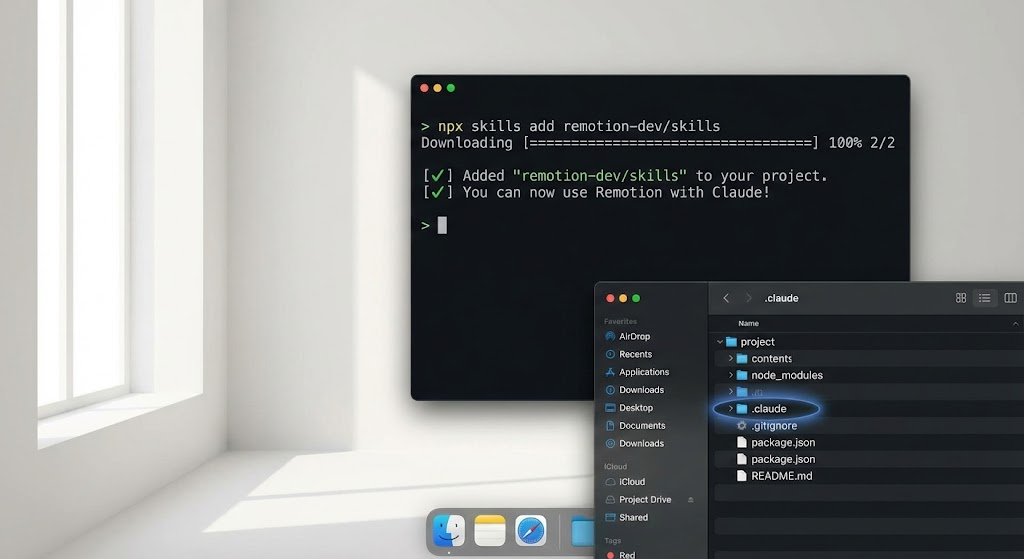
Open your terminal in your Remotion project and run:
npx skills add remotion-dev/skillsThat's it. This installs a hidden instruction file that teaches Claude how to write proper Remotion code — much like installing a workflow preset instead of manually editing every video from scratch. Think of it like downloading a "Video Production Masterclass" directly into Claude's brain.
What actually gets installed
After installation, a small folder appears in your project:
.claude/skills/remotion/Inside is a detailed guide that tells Claude:
How to structure different video types (intros, demos, reports, social clips)
Which animation styles work best for smooth vs. bouncy effects
How to calculate timing so everything syncs perfectly
Common mistakes to avoid when rendering videos
You never need to open or edit this file. It works automatically in the background.
How Claude detects and uses it
Whenever you start Claude Code inside your project, it automatically scans for available skills and loads them into context.
From that point on, Claude treats Remotion as a first-class video system—not a generic web animation task.
Verify It’s Working (30-Second Check)
To confirm the skill is active, try a simple prompt:
“Create a 10-second product demo with our logo appearing, followed by three feature highlights, ending with a call-to-action.”
If everything is set up correctly, Claude will generate working Remotion code using proper structures like
and<Composition>
, with timing that matches the request.<Sequence>If Claude seems unsure or produces generic or broken output, simply rerun:
npx skills add remotion-dev/skills
Where the Skill Is Applied in Your Project
Remotion projects follow a predictable structure: a central entry point, individual video compositions, and shared settings for resolution and frame rate.
The agent skill teaches Claude this layout—and how to work within it.
As a result, when you ask for a new video, Claude:
Knows where the composition should live
Sets the correct timing, resolution, and frame rate automatically
Generates code that follows Remotion’s recommended structure
This prevents common mistakes that break renders and keeps your project organized as it scales.
The New Workflow: Prompt → Render → Polish
How Claude Code Interprets Video Instructions
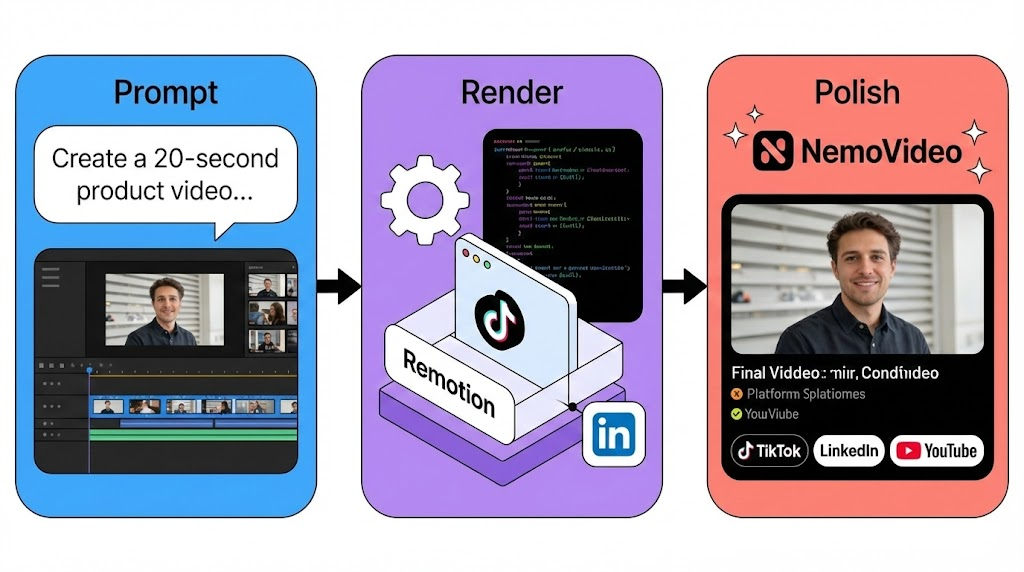
Once Agent Skills are installed, you no longer think in timelines or keyframes—you think in intent.
You describe your video in plain English:
“Create a 20-second product launch video. Logo fades in for 3 seconds, then show three feature slides—5 seconds each—and end with a call-to-action.”
Claude translates this into a concrete video plan:
Total duration: 20 seconds
Sequence: Logo (3s) → Feature 1 (5s) → Feature 2 (5s) → Feature 3 (5s) → CTA (2s)
Animation logic: Fade-in for the logo, slide transitions for features
The output is a fully structured, frame-accurate Remotion composition with correct timing and sequencing.
Why This Replaces Timeline Editing for Some Workflows
Traditional editors require manual timelines: dragging clips, adjusting transitions, and repeating the same edits every time content changes.
With code-driven video:
You define the structure once
Update text, numbers, or colors via variables
Re-render instantly with new data
This makes video creation dynamic, scalable, and automation-friendly — ideal for dashboards, recurring product demos, and localized content where structure stays fixed but data changes weekly.
This approach pairs well with batch repurposing workflows, where one core asset is adapted into multiple formats for different platforms without starting over.
Spec Formats That Work Best
The clearer the spec, the fewer revisions needed. Detailed prompts often get you 90% of the way on the first render. Claude performs best when your prompt includes four types of information:
1️⃣ Duration and frame rate
“15 seconds at 30fps” → Claude calculates 450 frames automatically
30fps for most web content; 60fps for smoother motion
2️⃣ Aspect ratio and platform context
“YouTube video” → 1920×1080 (landscape)
“TikTok / Reels” → 1080×1920 (vertical)
“Instagram post” → 1080×1080 (square)
3️⃣ Scene structure and transitions
“Logo appears from 0–3s, then fades out”
“Product demo starts at 5s and runs for 8s”
“Slide transition, 0.5s duration”
4️⃣ Brand tokens
Colors, fonts, spacing, logo placement
Example: “Montserrat Bold, 48px, white; navy gradient background”
How NemoVideo Makes Videos Viral-Ready
Remotion produces technically correct videos: clean renders, accurate timing, and predictable structure. What it doesn’t handle is platform optimization.
That’s where NemoVideo fits in.
Upload your Remotion MP4, and NemoVideo becomes the finishing layer:
Suggests viral hooks based on current trends (Inspiration Center)
Analyzes pacing and removes redundant words (Talking-Head Editor)
Apply viral caption styles in one click (Smart Caption)
Auto-generates platform-specific formats (Platform Intelligence)
Creates multiple platform variants from one source video
With Talk-to-Edit, you can say:
“Add bold yellow captions, suggest a LinkedIn hook, and create a TikTok vertical version.”
NemoVideo outputs publish-ready files in minutes.
The workflow is clear: Remotion handles automation and structure. NemoVideo handles polish, pacing, and platform fit.
Complete your pipeline and try NemoVideo for free today! 🚀
5 Best Use Cases for Code-Driven Video
Code-driven video isn't right for everything. But for these scenarios, it crushes traditional editing.
Data-Driven Dashboard Videos
Weekly performance videos need updated metrics. Timeline editors require manually updating numbers and re-syncing everything.
With Remotion: Update data variables (signups: 520, revenue: $14,100), re-render, done. A SaaS team generates Monday dashboards in 5 minutes weekly.
Template-based marketing videos
A/B testing video ads means the same structure, different headlines and CTAs. Timeline editors force manual duplication.
With code: Change text variables, render 10 versions instantly. NemoVideo extends this with automated variant creation similar to how CapCut viral templates are adapted across campaigns — without manual re-editing for platform-specific versions — TikTok with faster pacing, LinkedIn with professional hooks. One user reports "AI editing improved A/B testing efficiency" significantly
No credit card is needed to test your first workflow.
Localization and multi-language variants
Product demos in 5 languages mean duplicating projects and manually replacing text.
With Remotion: Pass language variables, render all versions in one command. This is especially powerful when combined with automated caption systems designed for Instagram and TikTok distribution. Global brands save 15+ hours per campaign.
Versioned Product Demos
SaaS products ship new features every sprint. Timeline editors need re-recording and re-syncing.
With code: Update asset paths and text variables. Dashboard changed? Swap the screenshot. CTA changed? Update one line, re-render in minutes.
Automated content at scale
Agencies need 200 personalized videos or daily social content for 50+ clients. Timeline editing breaks at scale.
With Remotion: Build template once, connect to spreadsheet, render overnight.
With NemoVideo: Process instructions like "Create three versions for different demographics" to generate platform-optimized variants without expanding team size.
For high-volume workflows, check NemoVideo's pricing to see how it fits your agency model.
Common Failure Modes and How to Fix Them
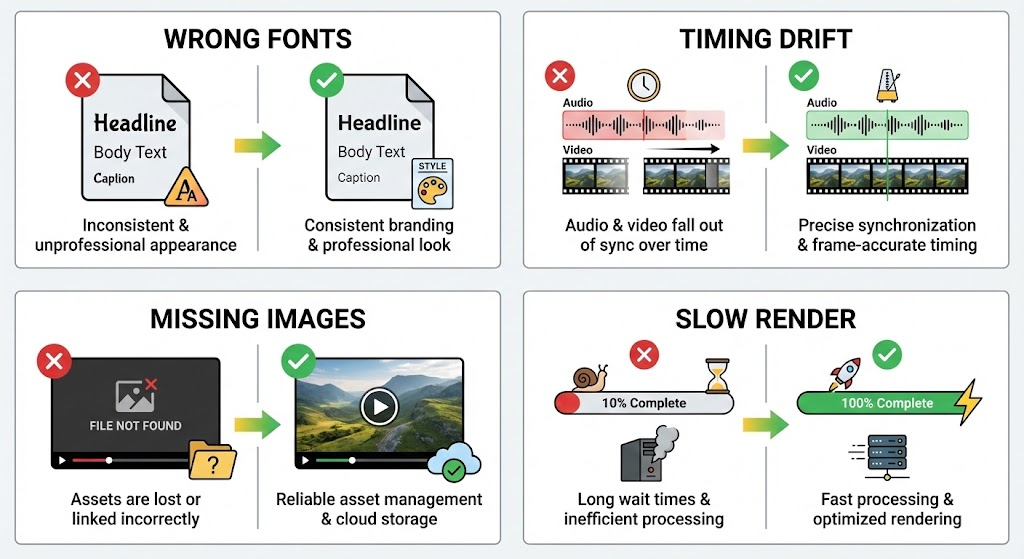
Font loading and fallback issues
Your video renders, but text shows up in Times New Roman instead of your brand font. This happens when Remotion can't load custom fonts.
The fix: Use web-safe fonts (Arial, Helvetica) or host your custom fonts properly. If using Google Fonts, import them at the top of your component. Claude knows this pattern from the Agent Skills and will usually handle it correctly—but if text looks wrong, check the font import.
Quick test: Render a 3-second clip before committing to a full video. Catch font issues early.
Timing drift between scenes
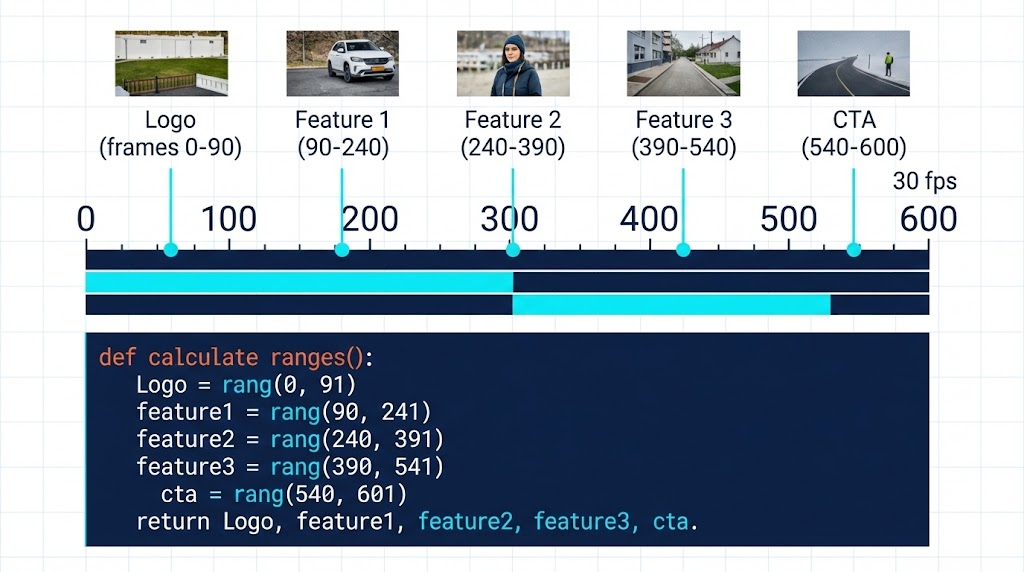
Scene transitions feel off—a logo disappears too early, text overlaps with the next scene. This usually means frame calculations don't add up.
The fix: Be explicit about timing at your prompt. Instead of "3 seconds for the logo, then 5 seconds for features," say "Logo from frames 0-90, features from frames 90-240." Claude calculates this automatically at 30fps, but double-checking frame counts prevents drift.
Asset resolution and path errors
Video renders but images are blurry or missing entirely. Path errors happen when Remotion can't find your assets.
The fix: Put all images in a dedicated
folder. Reference them aspublic/
not/logo.png
. Claude follows this pattern from the skills, but if you're uploading assets manually, consistent paths prevent headaches../assets/logo.png
Performance bottlenecks during render
Your 30-second video takes 10 minutes to render. Complex animations or high-resolution assets slow everything down.
The fix: Reduce resolution during testing (render at 720p instead of 1080p). Once the structure is right, render final output at full resolution. Heavy effects like blur or shadows increase render time—use them sparingly or simplify for faster turnaround.
When You Should NOT Use Remotion Agent Skills
Fast social edits that need human timing
You see a trending topic and need a reaction video posted in 2 hours. Remotion is too slow—by the time you prompt, render, and troubleshoot, the trend has moved on. Social content relies on instinct and speed—you need tools that let you cut, adjust, and publish in minutes, not tools that require code generation.
Casual creators without dev workflows
You're a YouTuber or small business owner who doesn't have a terminal open and doesn't think in "frames" or "components." Remotion assumes technical comfort—installing packages, running commands, debugging errors. If that sounds painful, conversational AI editors like NemoVideo or drag-and-drop tools will feel more natural.
One-off creative edits with heavy visual intuition
You're editing a wedding video, a documentary, or an artistic short film where every cut matters and pacing changes based on emotion, not data. Code can't replicate creative intuition. Remotion excels at structure and consistency, but it can't make artistic judgment calls. For deeply personal or visually experimental projects, human touch wins.
Conclusion
Remotion Agent Skills change how you think about video production. Install with one command, describe what you want, and Claude handles the execution. For template-based content or high-volume production, this workflow beats timeline editors on speed and scale.
Code-generated videos still need final polish. NemoVideo adds platform captions, viral hooks, and multi-format exports—turning technically perfect videos into scroll-stopping content.
Ready to complete your automation stack?
⚡Try NemoVideo for free today and experience the complete workflow.