

Captions aren't just an afterthought anymore. They are the essential link that connects your video to viewers, ensuring it gets watched, understood, and found on every platform.
If your videos are stuck in the dreaded "300 views jail" or your product videos never convert to actual sales, the problem might not be your content—it might be how accessible that content is. The professionals winning the video content revolution treat captions as a core creative element, not a simple accessory.
This guide cuts through the noise. It distills the best practices that work in today's fast-moving, AI-enabled world, ensuring you can scale your video creation without the long editing time and repetitive dirty work. We'll show you how AI tools make compliance a breeze and how to master subtitle technology for maximum impact.
A modern, abstract visual symbolizing video captions, accessibility, growth, and connection
A - Attention: Are Your Videos Leaving Money on the Table?
You’re a real estate agent, a fitness coach, or a small business owner—you need video to grow. But you're tired of jumping between five different apps: ChatGPT for the script, CapCut for a basic edit, and a separate tool just for captions.
The truth is, 85% of people watch videos with the sound off. Without great captions, you’re missing the chance to engage a massive audience. The required professional editing skills for Adobe and the overly UGC style of CapCut just don’t cut it when you need high-conversion content.
It's time for a better way.
I - Interest: What "Good" Captions Actually Look Like (The Four Pillars)
Before you automate, you need to know the goal. What separates a truly great caption from a bad one?
Professional-grade captions, which are essential for accessibility (especially in the US where compliance is strict), are judged by four key quality pillars:
Accuracy: The words must match the spoken content, and all names, numbers, and key terms must be correct.
Synchronicity: The text's timing must align perfectly with the speech. No awkward, orphaned words or late entries.
Completeness: All dialogue is included, and meaningful non-speech audio (like [music] or [applause]) is represented when necessary.
Placement: The captions must be legible, avoid obscuring important visuals, and stay within safe viewing areas.
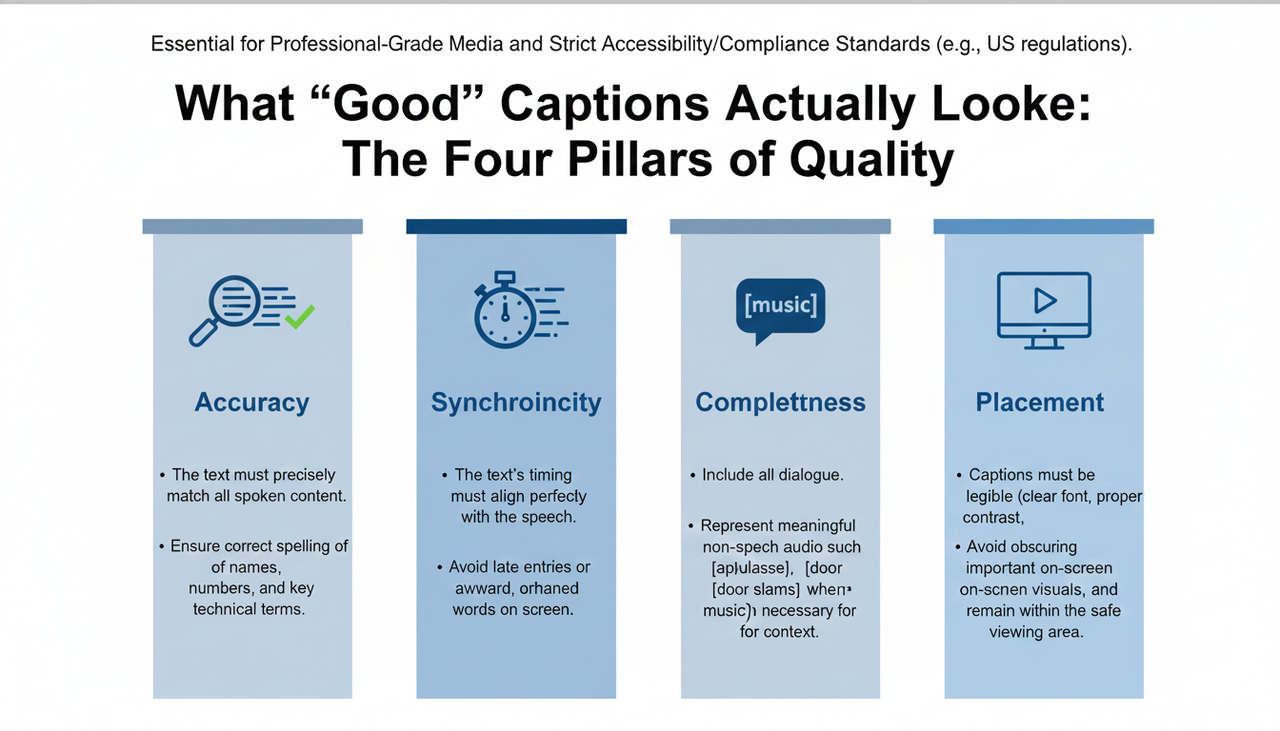
nfographic: Four Quality Pillars of Caption
Meeting US Accessibility Standards (It's Non-Negotiable)
For accessibility, particularly in the US market, compliance with the W3C’s WCAG 2.2 for prerecorded media is the baseline. Specifically, the U.S. government’s guidance on Section508 — Captions and Transcripts provides clear expectations on synchronization and speaker identification that your quality assurance (QA) team must follow.
Beyond compliance, readability rules from professional subtitling keep your viewers happy:
Characters per Line (CPL): Stick to a maximum of about 42 CPL, generally using only two lines per event. Netflix uses these thresholds in their own guide.
Reading Speed (CPS): Aim for roughly 20-21 characters per second for most audiences. This prevents users from struggling to keep up.
D - Desire: The End-to-End Workflow That Unleashes Creativity
The old, complex editing pipeline left no space for your creativity and took the control from you. That's the beauty of using an AI Creative Buddy—it handles the automatic subtitle generation and compliance rules, leaving you to focus on the story.
Here is the simple, scalable workflow that balances speed, accuracy, and compliance:
The Setup: Clean Audio & AI Transcription
Lock Picture: Finish your final video edit before you add captions. This prevents the nightmare of timecode drift.
Transcribe with AI: Use a reputable ASR (Automatic Speech Recognition) engine. Export the resulting timestamps in SRT or VTT format.
The Human Polish (Where Nuance Wins)
Human QA (Non-negotiable): You must check proper names, numbers, URLs, and brand terms. AI is fast, but humans are smart.
Fix Line Breaks: Break lines by natural sense units (phrases), not just random screen width.
Add Cues: If required for accessibility, add non-speech cues like [music] or [laughter].
Formatting, Export, & Validation
Mobile-First Design: Keep it to two lines max, bottom-center. Use a semi-opaque background for high contrast.
The Best Option: For searchability and user control, always prefer uploading a caption track (SRT/VTT) over a "burned-in" text that's permanently part of the video.
🛠️ How NemoVideo's Conversational Editing Works
(Simplified Technical Explanation)
NemoVideo's core innovation is "Dialogue-Based Editing". Instead of scrubbing a timeline, you edit the video by editing the transcript!
Ingest & Transcribe: You upload your video. The proprietary AI engine performs instant, high-accuracy automatic subtitle generation and transcription.
Conversational Edit: The video becomes a text document. You delete a sentence from the transcript, and NemoVideo immediately cuts the corresponding video segment.
Refine & Export: This process allows for intelligent rough cuts and quick flow fixes, eliminating up to 80% of manual, repetitive work. It’s a "zero-frustration" philosophy.
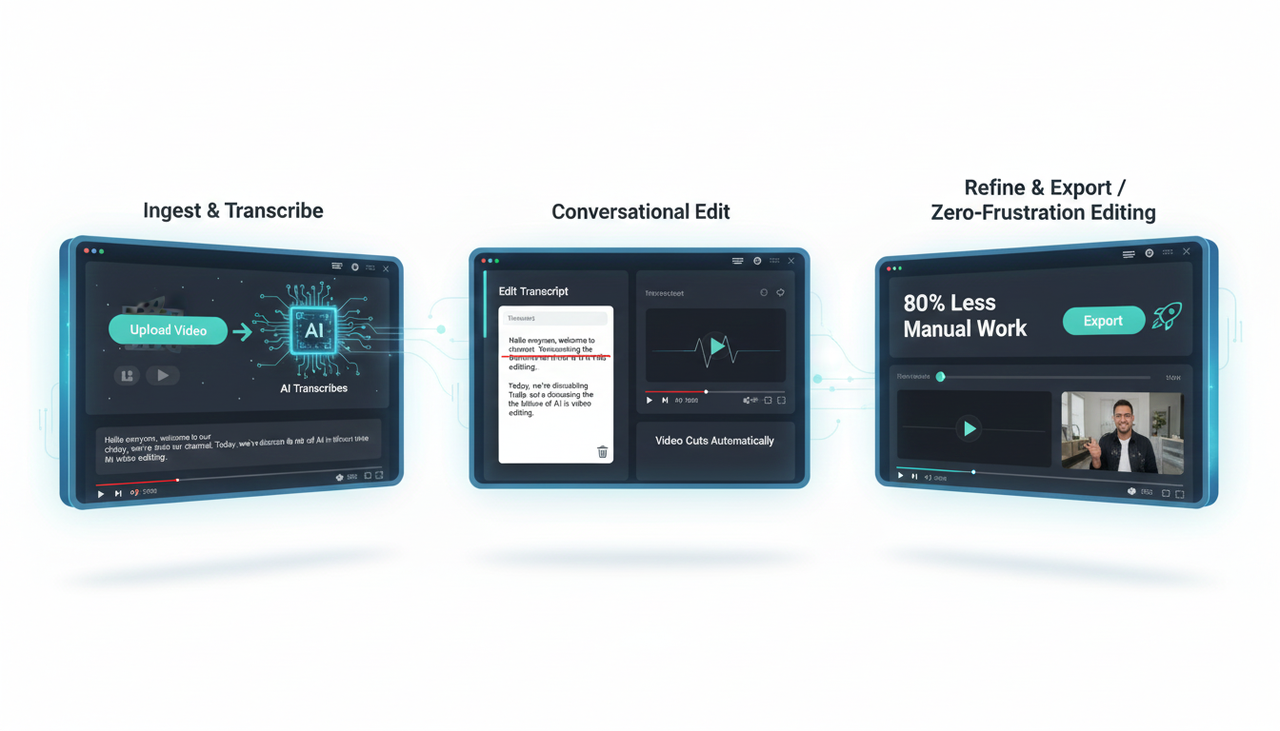
NemoVideo workflow: Ingest, transcribe, conversational edit, refine, export
The AI Comparison: Automation vs. The Creative Buddy
Feature | Traditional Editor (e.g., Adobe) | AI-Augmented Editor (e.g., CapCut) | NemoVideo: The AI Creative Buddy |
Subtitle Workflow | Manual transcription/timing or paid service. | Auto-generated, limited editing options. | Fully automatic subtitle generation, directly editable transcript. |
Editing Style | Timeline-based; complex skill required. | Basic UGC-style cuts; often too simple. | Dialogue-Based Editing; Edit the text to cut the video. |
Creative Control | Full, but time-consuming. | Automated that leaves no space for your creativity26. | Full control, but AI handles the dirty work27. |
Watermark | No. | Often present on free tiers. | Watermark-Free Export on the free tier282828. |
US Accessibility | Manual checks required. | Basic, often misses non-speech cues. | Integrated QA checklist guidance. |
Platform Execution Notes: A Quick Checklist
When it comes to publishing, each platform has its own rules.
YouTube (including Shorts): Always upload the caption tracks (SRT/VTT). Refer to YouTube’s official help on adding subtitles and captions. For Shorts, keep an eye on UI overlays that might hide text(29).
TikTok (Organic & Ads): For organic posts, use the in-app auto-captions and edit them before posting, as external SRT uploads aren’t widely supported. For ads, follow the safe-zone principles for your creatives. Check out their guidance on Accessibility for watching videos. Remember to adhere to FTC disclosure rules when Promoting a brand, product, or service.
Instagram (Reels/Stories) & Facebook: Use the built-in sticker workflow for organic posts. For ads, use the Ads Manager to upload the SRT file for the highest accuracy.
Establishing Authority: The Market Size of AI Video
The push for better subtitle technology isn't just a trend; it's a massive market shift. The AI Video Creation Market, which includes tools for advanced tasks like automatic subtitle generation, is projected to grow from $900 million in 2023 to $4.4 billion by 2033. This exponential growth means that the "struggled with inspirations" and "long editing time" problems are being solved by intelligent tools, and you need to be an early adopter to lead your local market.
A - Action: Ready to Stop Editing and Start Creating?
You are no longer limited by complex software, long editing times, or the fear of compliance failure.
NemoVideo is your All-in-one tool for eliminating the tedious work, meaning you don't need to jump between TikTok for inspiration, ChatGPT for script, CapCut, and many other tools.
It offers you the unique advantage of a watermark-free export even on the free tier, giving you a completely risk-free way to try the video content revolution.
Ready to unleash your creative potential with an AI Creative Buddy?
👉 Nemo (AI Video Editor) is waiting. Give it a try now and see how fast you can create high-converting video!
❓ Frequently Asked Questions (FAQ)
Does NemoVideo’s free plan support automatic subtitle generation?
Yes! Our core AI tools and the conversational editing feature, including automatic subtitle generation, are available in the free version. Even better, we offer a watermark-free export on the free tier to lower the bar for you to try it out.
What are the key rules for making captions compliant in the US?
In the US, you must adhere to WCAG 2.2 standards. The practical rules involve ensuring all speech is captioned, timing is perfectly synchronized, speakers are identified, and non-speech cues (like [music]) are added where they are meaningful.
Can I use NemoVideo for ads on platforms like TikTok?
Absolutely. NemoVideo is designed for high-conversion content like ads. You can use it to create videos for Commercial Music Library usage and ensure your content adheres to Creative best practices for high performance. The focus on high-quality, editable captions makes it a powerhouse for all types of ad campaigns.