

Twitter Video Tool Guide: How to Edit for X in 2026
If you're a content creator, brand marketer, or e-commerce seller trying to scale video output on X (formerly Twitter), you're facing a real challenge: churning out multiple video variants per week while keeping quality high and editing time low.
You need more than just best practices—you need a proven workflow that guarantees both speed and quality.
This guide gives you the complete solution: the latest Twitter video specs for 2026, a proven step-by-step editing workflow, and a reliable twitter video tool like NemoVideo—an AI-powered platform that auto-formats videos for Twitter, generates viral hooks, and lets you edit through natural conversation instead of manual timeline work.
Want to see automation-first editing in action? Step into NemoVideo's Workspace and discover how creators produce scroll-stopping Twitter videos in minutes.
Why Video Editing Matters for Twitter Success
Twitter Video Engagement Stats in 2026
As the demand for video content on Twitter continues to grow, the platform has become increasingly focused on video performance. According to recent social media research, key trends highlight the importance of optimized video editing:
Video tweets get 10x more engagement than text-only posts
Videos with captions are 33% more likely to be watched to completion, even without sound.
The first 3 seconds are crucial—users decide whether to continue watching within the first few moments.
Videos with optimized dimensions (720p or 1080p) and fast-paced edits consistently outperform poorly formatted or long-winded content.
What Makes a Twitter Video Go Viral
If you don't understand what makes Twitter videos explode, you can't create content that actually performs. Here's what actually works in 2026:
Front-loaded value. The strongest performers put their core message in the first 2-3 seconds. No "wait for it" moments—just instant impact.
Captions are mandatory. With 85% of Twitter users watching without sound, if your video doesn't have captions, you're essentially invisible to most of your audience.
Mobile-first formatting. Over 90% of Twitter browsing happens on mobile. Vertical (9:16) and square (1:1) videos dominate feed real estate and get higher completion rates.
Visual consistency. Successful creators use recognizable editing patterns—consistent fonts, brand colors, and pacing—so their content is instantly identifiable in the scroll.
For more insights on Twitter video strategy, check out X's official best practices guide.
The great news? You don't need a big budget or advanced editing skills to create viral content.
With NemoVideo, an AI-powered Twitter video editor that leverages features like Talk-to-Edit for quick tweaks, Inspiration Center for proven viral hooks, and Platform Intelligence to auto-format your videos for Twitter, you can generate high-quality, viral-ready content in just minutes.
Twitter Video Specs You Must Know
Before you start editing, you need to know the "rules of the road". If you use the wrong settings, X will make your video look blurry.
Here’s what actually works on Twitter now:
Video Length, Format, and Resolution
Length: X has different limits depending on your subscription tier:
Free Users: Maximum 140 seconds (2 minutes and 20 seconds)
Premium Users: Up to 4 hours on web and iOS; 10 minutes on Android
For engagement, shorter is better. Most viral Twitter videos are 15-60 seconds—just long enough to deliver value without losing attention.
Format: Twitter supports MP4 and MOV with H.264 codec and AAC audio. MP4 is generally preferred for its balance of quality and file size.
Need help with technical settings? Learn more about video codec optimization for social media.
Resolution:
Minimum: 32 x 32 pixels
Maximum: 1920 x 1200 (landscape) or 1200 x 1900 (portrait)
Recommended: 1080p (1920 x 1080) or 720p (1280 x 720) for professional-looking videos
Pro tip: If you're editing with NemoVideo, the Platform Intelligence feature auto-detects and optimizes your resolution for Twitter, so you don't have to manually calculate pixel dimensions.
Aspect Ratio for Feed vs Timeline
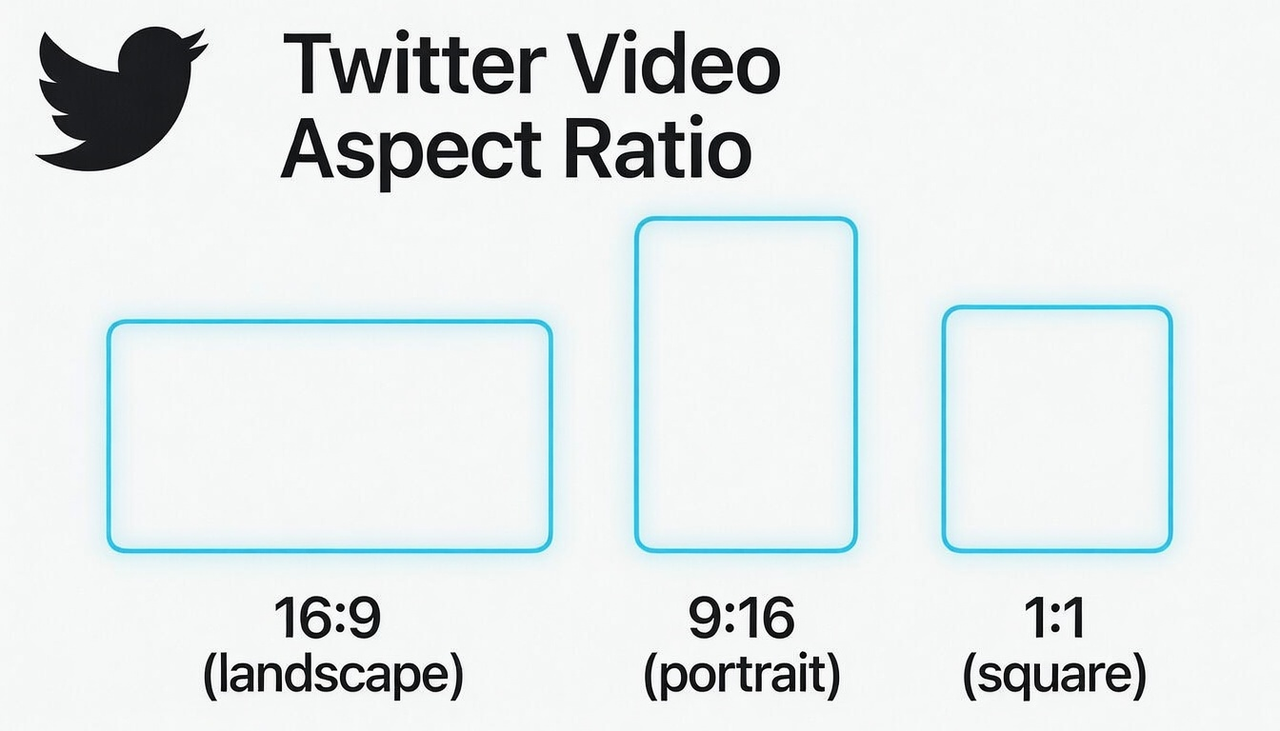
Aspect ratio determines how much screen real estate your video captures. Here's what works best in 2026:
Vertical (9:16): The mobile winner. Vertical videos dominate the entire mobile screen, leading to higher engagement and watch time. This is the format TikTok and Instagram Reels trained users to expect.
Square (1:1): The all-rounder. Works well in both feed and timeline, captures more screen real estate on mobile than landscape, and is platform-flexible.
Landscape (16:9): Best for desktop viewing and YouTube repurposing. However, on mobile feeds (where 90% of users browse), landscape videos take up less screen space and get fewer impressions.
If you're creating multiple versions for different platforms, NemoVideo's one-click aspect ratio conversion saves hours of manual resizing.
File Size Limits
Free Users: Maximum 512 MB
Premium Users: Up to 16 GB on web and iOS
If your file exceeds these limits, you'll need to compress it. But here's the smart approach: export at the optimal settings from the start rather than compressing later and losing quality.
Pro tips:
Export at 1080p, 30fps, H.264 codec for the best balance of quality and efficiency
Tools like NemoVideo handle this automatically through smart export presets, so you're always within Twitter's optimal range
For the latest official specifications, check the Official X Video Help Center.
How to Edit Videos for Twitter (Step-by-Step)
In this part, I'll walk you through step-by-step the exact editing workflow top creators use—from hook to final export, so you can turn raw footage into viral-ready videos in under 30 minutes.
Step 1: Plan a Hook That Grabs Attention
The first 2-3 seconds determine everything, you need to make a strong impression immediately.
Ask a provocative question: "Why do 90% of Twitter videos fail?"
Make a bold claim: "This one trick tripled my views."
Show instant value: "Here's how to edit videos in 5 minutes."
Pro tip: Use NemoVideo’s Inspiration Center, which suggests proven hooks based on viral content trends. With just a few clicks, you can instantly create attention-grabbing intros.
Step 2: Streamline Your Editing with NemoVideo
Not all video editors are built for Twitter's fast-paced environment. You need a tool that understands platform requirements and automates the tedious parts.
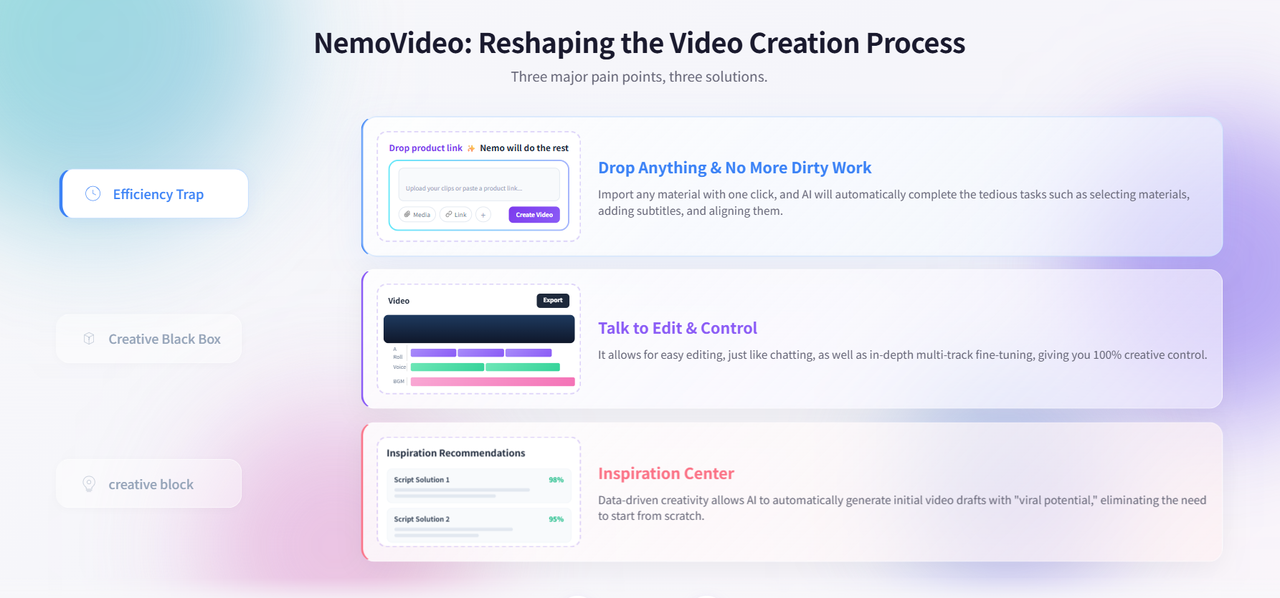
Why NemoVideo works for Twitter editing:
Drop Anything: Upload product links, scripts, raw footage, or even competitor videos—NemoVideo understands your input and starts creating
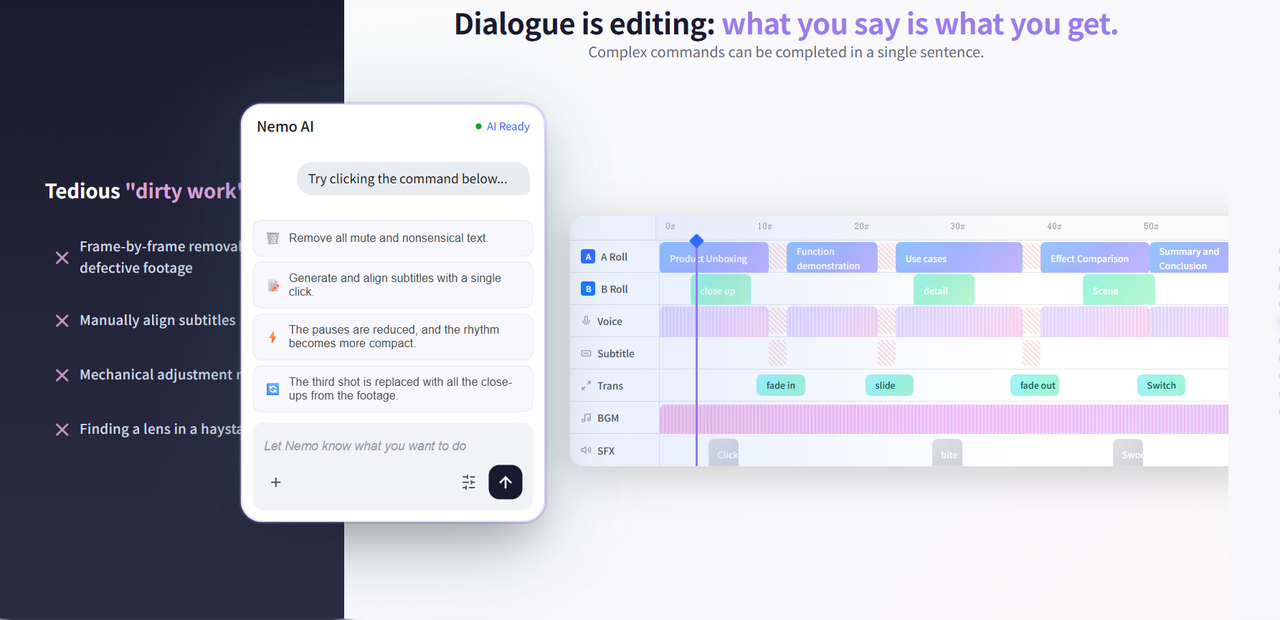
Talk-to-Edit: Skip complicated menus. Just say "make this vertical" or "add captions" and it's done
Platform Intelligence: Auto-formats your video for Twitter's exact specs (aspect ratio, resolution, file size)
SmartPick: Automatically selects your best footage moments so you don't waste time scrubbing through clips
Traditional editors like Premiere Pro require hours of learning. NemoVideo gets you from idea to finished video in minutes, not hours.
Before you start editing, you can check if Nemo AI Editor’s free option works for you.
Step 3: Cut the Fluff—Every Second Must Earn Its Place
Video length and pacing are critical on Twitter. A fast, engaging rhythm keeps viewers hooked until the end.
Key tips for trimming:
Remove unnecessary intro sections that delay delivering value.
Cut out pauses to maintain the video’s energy.
Highlight key moments by zooming in or emphasizing visually impactful moments.
Don’t go overboard with cuts—you want your video to flow smoothly, not feel jumpy.
With NemoVideo's Talk-to-Edit, simply tell it "trim the dead air" or "speed up the pacing", and the AI handles the technical execution. No timeline scrubbing required.
Step 4: Add Captions or Lose 85% of Your Audience
This is non-negotiable. 85% of Twitter users watch videos with sound off. No captions = invisible content.
Caption best practices:
Keep text large and readable: Minimum 60pt font size
Use high contrast: White text with black stroke works on any background
Place strategically: Center or lower-third positioning avoids Twitter's UI overlap
Break into short phrases: 3-5 words per line, synced to speech rhythm
Manual captioning is painful. You have to transcribe, time each line, and adjust placement frame-by-frame.
The NemoVideo shortcut: Auto-generates accurate captions with one click. You can edit the text using Talk-to-Edit (just say "change this line to...") without touching the timeline.
🎬 Try Smart Captions in One Click
Step 5: Export with Twitter-Perfect Settings
Even a perfectly edited video will look terrible if you export it wrong. To ensure your content stays crisp and avoids the dreaded "Twitter blur," you must follow the latest technical guidelines.
For a deep dive into the specific bitrates and codecs required to maintain high fidelity, check out our Twitter video tool and viral specs guide.
Twitter-optimized export settings:
Resolution: 1080p (1920 x 1080)
Frame rate: 30fps (not 60fps—it bloats file size without visible quality gain)
Codec: H.264
Bitrate: 5000 kbps for 1080p, 2500 kbps for 720p
Audio: AAC-LC, 128 kbps
Step 6: Post Your Video for Maximum Reach
You're ready to publish. Here's how to maximize performance:
Upload directly to Twitter (not YouTube links). Native videos get 6x more engagement than external links because they autoplay in the feed.
Upload checklist:
Draft your tweet copy first (280 characters max—make it count)
Add 2-3 relevant hashtags (but don't overdo it)
Upload your video and let Twitter process it
Preview before posting to check aspect ratio and quality
Post during peak hours according to your timezone
When you’re ready to post, NemoVideo can help you optimize each video for different platforms, ensuring your content gets the most views and engagement possible.
5 Pro Tips for Better Twitter Videos
Making a good video is just the start. To really win X in 2026, you need to use these five pro tricks to stand out from the crowd.
Put Your Best Point First
The strategy: Place your strongest point in the first 5 seconds, not at the end.
Why it works: Use the inverted pyramid structure—conclusion first, then explanation. Even viewers who scroll away early still get your core value.
Pro move: Introduce pattern interrupts (quick cuts, text pops) every 10–15 seconds to reset attention and keep viewers engaged until the end.
Use Text Overlays Strategically
Beyond simple captions, text overlays amplify your key messages.
How to use them:
Highlight data: Display "300% increase" when mentioning key stats.
Create visual hierarchy: Use size and color to direct attention.
Reinforce CTAs: Display animated text when you say “link in bio” to emphasize action.
Critical rule: Keep overlays in the center 70% of the frame — Twitter’s mobile UI overlaps the edges.
Match Your Brand Aesthetic
Instant recognition comes with consistent visuals.
Key elements to keep consistent:
Color palette: Use 2–3 brand colors across all videos.
Typography: Stick to 1–2 fonts to maintain a uniform look.
Format: Keep the opening/closing consistent, so viewers know it’s you before they even see your username.
With NemoVideo, save and apply your brand templates with just one click to maintain your aesthetic across all videos.
Test Aspect Ratios Like a Pro
Different content works better in different formats. Here’s how to optimize:
Vertical (9:16): Perfect for talking-head videos or product showcases.
Square (1:1): Great for infographics or tutorials.
Landscape (16:9): Ideal for screen recordings or detailed demos.
Testing method: Post the same video in multiple ratios on different days, compare completion rates, and let the data decide which performs best.
Analyze and Iterate
Track key metrics using Twitter Analytics 48 hours after posting:
Completion rate: How many watched to the end?
Engagement rate: Likes/retweets per view.
Drop-off points: Where did viewers stop watching?
Action plan: Identify patterns in top performers → Test one variable at a time → Refine based on data, not assumptions.
Common Twitter Video Mistakes to Avoid
Even experienced creators fall into these traps. Here are the fatal errors that kill engagement—and how to fix them.
The Link Trap: Putting a link in your main post will bury your video in the algorithm—Twitter suppresses posts with external links. Put links in the first reply instead to maximize reach.
Hashtag Overload: Using more than 2 hashtags makes your post look like spam and actually lowers your views. Stick to 1-2 highly relevant hashtags maximum.
The 4K Upload Mistake: Uploading 4K videos from the desktop gets rejected—Twitter only accepts up to 1920x1200 resolution on the web. Export at 1080p to avoid upload failures and quality loss from Twitter's compression.
Text-Heavy Overlays: Cramming too much text on screen (especially for ads—Twitter recommends less than 20% text coverage) makes your video look cluttered and reduces algorithm performance. Keep text minimal and strategic.
Inconsistent Posting: Posting 5 videos one day, then disappearing for a week confuses the algorithm and your audience. Aim for 1-2 videos per week on a consistent schedule—the algorithm rewards reliability.
Ignoring the First 6 Seconds: Twitter's algorithm tracks retention—videos that keep viewers watching past 6-8 seconds get massive organic reach boosts. Front-load your hook or lose the algorithm's favor.
FAQ
What is the best Twitter video tool?
NemoVideo stands out as the best tool for Twitter video editing due to its AI-powered, conversational interface. With features like Talk-to-Edit, automatic video optimization, and instant aspect ratio conversion, it allows creators to quickly produce high-quality videos tailored for Twitter’s specifications.
In addition, its AI-driven SmartPick feature saves time by selecting the best footage moments, making it ideal for fast, efficient video production.
Why is my Twitter video quality low?
Twitter compresses all uploads, but blurry videos usually result from wrong export settings. Common mistakes include uploading 4K (which Twitter downscales to 1080p anyway), using variable bitrate, or incorrect codec. You need to export at 1080p, 30fps, H.264 codec, 5000 kbps bitrate. Also avoid uploading landscape videos on mobile—they get aggressively compressed.
Can I make a video just from a product link with NemoVideo?
Yes. You can drop a link from a site like Amazon into NemoVideo. NemoVideo will automatically grab the pictures and descriptions to start a video draft for you.
Do I need captions on every Twitter video?
Yes, absolutely. 85% of Twitter users watch videos with sound off, so if your video relies on audio alone, you're invisible to most of your audience. Twitter doesn't auto-generate captions like YouTube does.
Should I post YouTube links or upload videos directly to Twitter?
Always upload directly to Twitter. External links (YouTube, Vimeo) get 6x less engagement because they don't autoplay in the feed and require users to leave the platform. Twitter's algorithm suppresses external links to keep users on-site.
Can NemoVideo be used for commercial and agency work?
Yes. NemoVideo is designed for commercial use and supports agencies managing client content at scale. The platform's bulk-versioning workflow (via Drop Anything and Platform Intelligence) is built for agencies that need to produce multiple ad variants quickly.
👉 Build Your First Variant Now
Conclusion
Ready to Create Scroll-Stopping Twitter Videos in Minutes?
You've learned the playbook—the specs, the workflow, the strategies that actually work in 2026.
Now NemoVideo gives you the execution speed to actually use it.
With Talk-to-Edit, SmartPick, and Platform Intelligence, you're not learning a tool—you're having a conversation with your AI Creative Buddy that handles all the technical heavy lifting.
⚡Accelerate your Twitter video workflow. Sign up for NemoVideo and start creating at speed—no cost!