
The Ultimate AI Video Software Workflow: Ship Your Video Projects in 3 Smart Steps
Are you tired of videos that get stuck in the "almost done" zone? You're a professional creator—a real estate agent, a fitness coach, or a marketing manager in the US—and your goal is to grow your business, but you're constantly fighting long editing hours and videos that don't drive sales. You need a workflow that guarantees seamless production without sacrificing quality or your creative control.
This guide will show you a three-step, AI-assisted process to move your video from a rough idea to a final, polished export in a fraction of the time. We'll help you stop worrying about repetitive "dirty work" and focus on innovative filmmaking. This system is powered by the right tools, including the ultimate AI video software, to ensure every video you ship drives real conversions.
Time Required: 60–120 minutes for a 30–60s short; longer projects scale proportionally.
Difficulty: Intermediate beginner (you know the basics of editing and exporting).

Step 1: Accelerate the First Cut—From Clunky Footage to a Clean Draft
The rough cut is the biggest time sink in editing. But guess what? AI can safely take over heavy lifting! We'll use automation to find the key moments, let you edit them by transcript, and remove filler—all while you remain in control of the story. This is about eliminating the "long editing time" pain point.
Ditch the Manual Cuts with AI Scene Detection
You don't need to scroll endlessly looking for the next shot. Use scene or shot detection features to automatically place cuts or markers across a long recording.
In tools like Adobe Premiere Pro, you can right-click a clip in the timeline and choose detection to insert cuts or markers. See Adobe’s instructions in the HelpX “Scene Edit Detection” guide if you are using a traditional NLE.
The Creative Buddy Way: If you're using ultimate AI video software like Nemo, the key visuals are detected automatically, saving you an extra step.
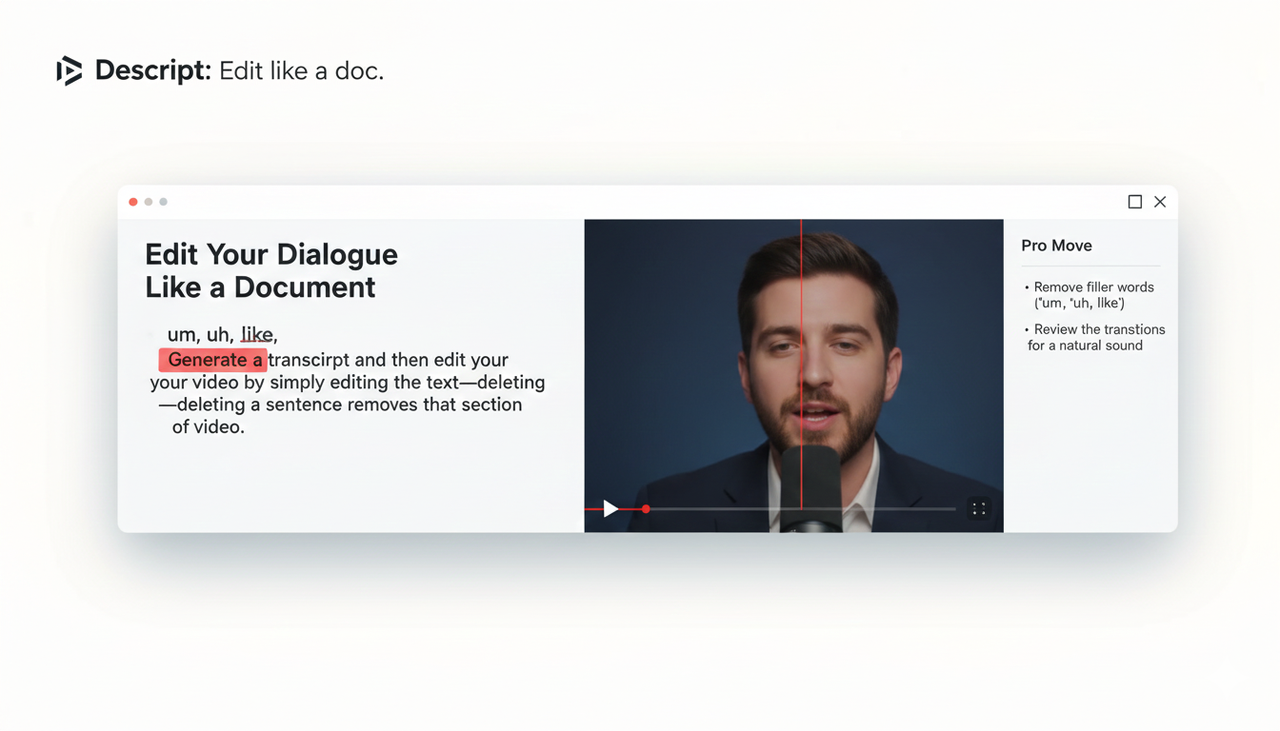
Edit Your Dialogue Like a Document
Why manually trim video when you can just delete text? Generate a transcript and then edit your video by simply editing the text—deleting a sentence removes that section of video.
Tools like Descript help you with this. The Descript help article “Edit like a doc” explains the text-to-video link.
The Pro Move: Remove filler words ("um," "uh," "like") and repetitive words, but always review the transitions so the speech sounds natural. Descript’s beginner tutorial expands on transcript editing and filler removal: “Descript Tutorial for Beginners: 6 Steps to Get Started”.
💡 Sanity Check (2–5 Minutes)
Your rough cut should be significantly shorter (20–40% is normal). Did you keep all the essential context? Are jump cuts acceptable? Great—you’ve won back serious hours.
Step 2: Optimize Pacing and Story Flow—Keep That Attention Hooked
A tight first cut is great, but a great video needs rhythm. Now, we use AI to match platform formats and keep the viewer interested (I - Interest and D - Desire from the AIDA Model).
Reframe for Every Platform (9:16, 1:1, 16:9)
The innovative filmmaking approach means creating one video that works everywhere. Your subject must stay framed, whether it’s a vertical phone screen or a widescreen monitor.
In Premiere Pro, Auto Reframe can track the subject and adapt framing for social formats; see Adobe’s guide on automatically reframing for social channels.
In DaVinci Resolve, Smart Reframe offers similar help. Refer to the Resolve 20 Editor’s Guide (Smart Reframe references).
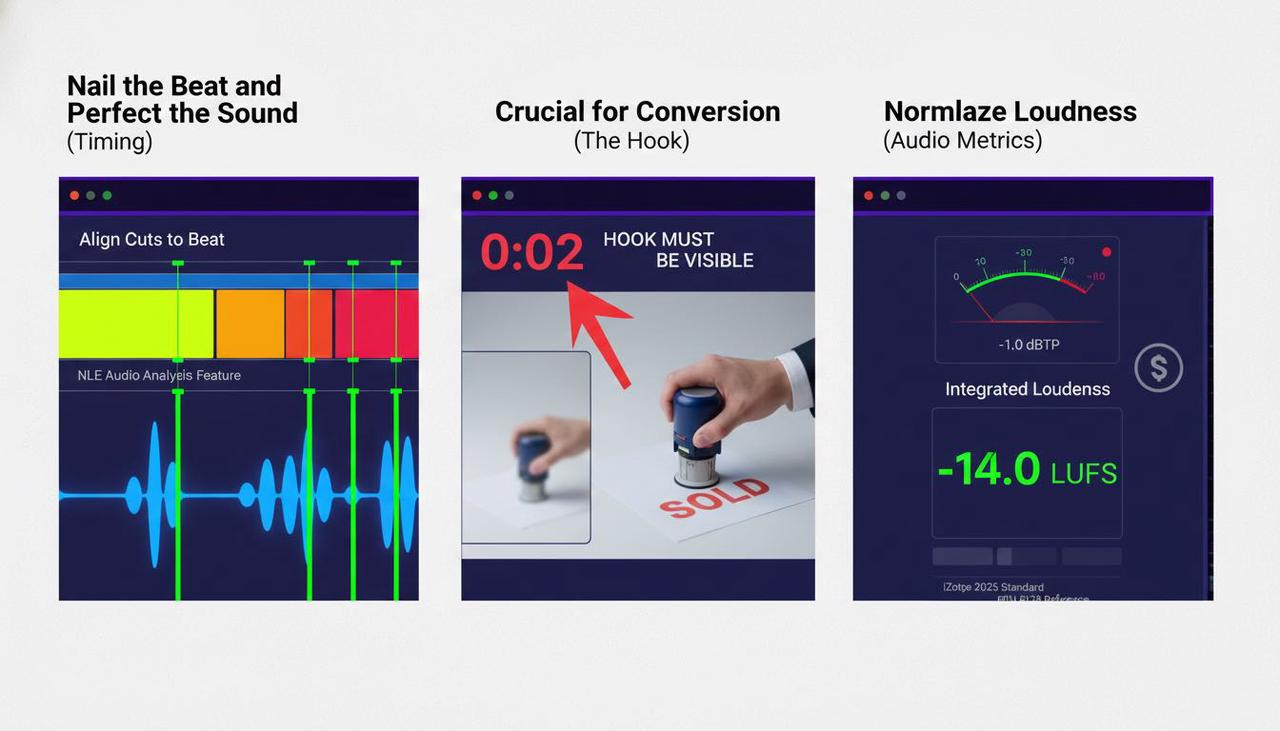
Nail the Beat and Perfect the Sound
Keep the momentum up by aligning your cuts to the music's beat. Most NLEs can analyze audio and place markers for you.
Crucial for Conversion: The hook must be visible within the first 2–3 seconds for short-form video. Don't let your "product videos that never convert" problem start here!
Normalize Loudness: For online video in the US, aim for around −14 LUFS integrated with a true-peak ceiling near −1 dBTP. See iZotope’s overview of mastering for streaming platforms (2025). If you want the reference, the official EBU R128 recommendation details targets used in broadcast engineering.
How NemoVideo Works: Your AI Creative Buddy Methodology
This is not a complicated piece of software; Nemo is an AI Creative Buddy. It uses a two-stage process that combines the best of cutting-edge AI with human control to achieve seamless production.
Content-Aware Core (The Smart Rough Cut): Instead of scene detection based on simple contrast, Nemo's AI analyzes your raw footage for faces, products, and key actions. It generates a "smart transcript" that highlights intent. This is what enables dialogue-based editing and instantly removes the filler words—you keep creative control, and the AI handles repetition.
Conversational Design (Zero-Friction Editing): All complex technical processes, like Auto Reframe or Loudness Normalization, are wrapped in a simple, conversational interface. You tell Nemo what you want ("Make this 9:16 for TikTok" or "Use a confident, uplifting track from the Commercial Music Library"), and the AI executes it. This is the "zero-frustration" philosophy of action.
Step 3: Scale and QC—Get Your Videos in Front of US Customers
You've done the hard part. Now, we'll use automation to get your video out the door, ready for the diverse demands of the US market, from Instagram Reels to YouTube Shorts.
Create Multiple Versions for Max Impact
Don’t just upload one version. Duplicate your master sequence for 9:16, 1:1, and 16:9. Swap the hooks or the Nemo (AI Video Editor) Call-to-Actions (CTAs) to target distinct audiences in your region.
Captions are Non-Negotiable: Auto-transcribe, correct the transcript, then generate captions. Adobe explains this flow in Auto-transcribe and Create captions from transcript. For platform publishing, always review the platform’s guidance on accessibility, such as TikTok’s Accessibility for watching videos.
Batch and Test: Automate Your Delivery
This is where the hours really disappear. Use a render queue to set up all your platform-specific versions at once.
In Premiere Pro, send each timeline to Adobe Media Encoder and assign presets; see Adobe’s export workflow overview.
The Nemo Advantage: As an ultimate AI video software, Nemo centralizes key-visual selection and multi-version exports in one place, which is perfect for professional creators aiming for efficiency.
📊 Comparison Table: Traditional NLE vs. Nemo (AI Creative Buddy)
Feature | Traditional NLE (Premiere, Resolve) | Nemo (AI Video Editor) | Goal Met |
First Cut | Manual trims, third-party transcript, manual silence removal. | AI detects key visuals, instant dialogue editing, one-click filler removal. | Time Savings |
Pacing/Rhythm | Manual beat matching, manual reframing per aspect ratio. | AI beat matching, "conversational reframing" for multiple formats. | Seamless Production |
Compliance/QC | Manual loudness check, manual caption generation. | Auto-check against platform loudness (e.g., -14 LUFS for US web), auto-captioning. | Zero-Frustration |
Output | Requires external encoder (Media Encoder) for batch exports. | Integrated batch export with full watermark-free 4K-supported delivery. | High Conversions |
Conclusion: Ready to Ship Better, Faster? (Action)
You now have a system for innovative filmmaking that guarantees a faster first cut, AI-assisted pacing and reframing, and robust batch versioning. For every real estate agent and fitness coach, this means less time editing and more time growing your business.
The Key Takeaway for US Creators: You no longer need to jump between CapCut (too UGC-style) and Adobe (too complex). You need the ultimate AI video software—a true AI Creative Buddy—that gives you the creative control you want and the automation you need.
Ready to stop editing and start creating?
Try Nemo (AI Video Editor) today!
Frequently Asked Questions (FAQ)
Q: Does this AI workflow work with the TikTok Auction In‑Feed Ads best practices?
A: Yes, absolutely. The workflow directly supports the best practices for Creative best practices by ensuring quick hooks, perfect reframing for 9:16, and high-quality captions, which are all essential for performance on that platform. You can also use the workflow to create multiple versions for Split test best practices.
Q: As an individual creator in the US, do I need to worry about FTC compliance with my product videos?
A: If you are promoting a product or service for a brand (including your own), you should always be mindful of disclosure. The core of this workflow is the content itself, but it’s critical to review the official guidance on Promoting a brand, product, or service and the FTC Endorsement Guides: What People are Asking. AI tools can help you generate accurate captions for transparency.
Q: How much time does the ultimate AI video software really save compared to traditional editing?
A: The market for AI video is booming, expected to grow from $900 million in 2023 to $4.4 billion by 2033. This exponential growth is driven by the AI’s ability to perform 80% of the repetitive work (like scene detection, filler removal, and batch exporting). Our users report cutting their average edit time by 40-50%.