

Stop Selling Static: Use Product Video Templates to Go Dynamic in 3 Steps
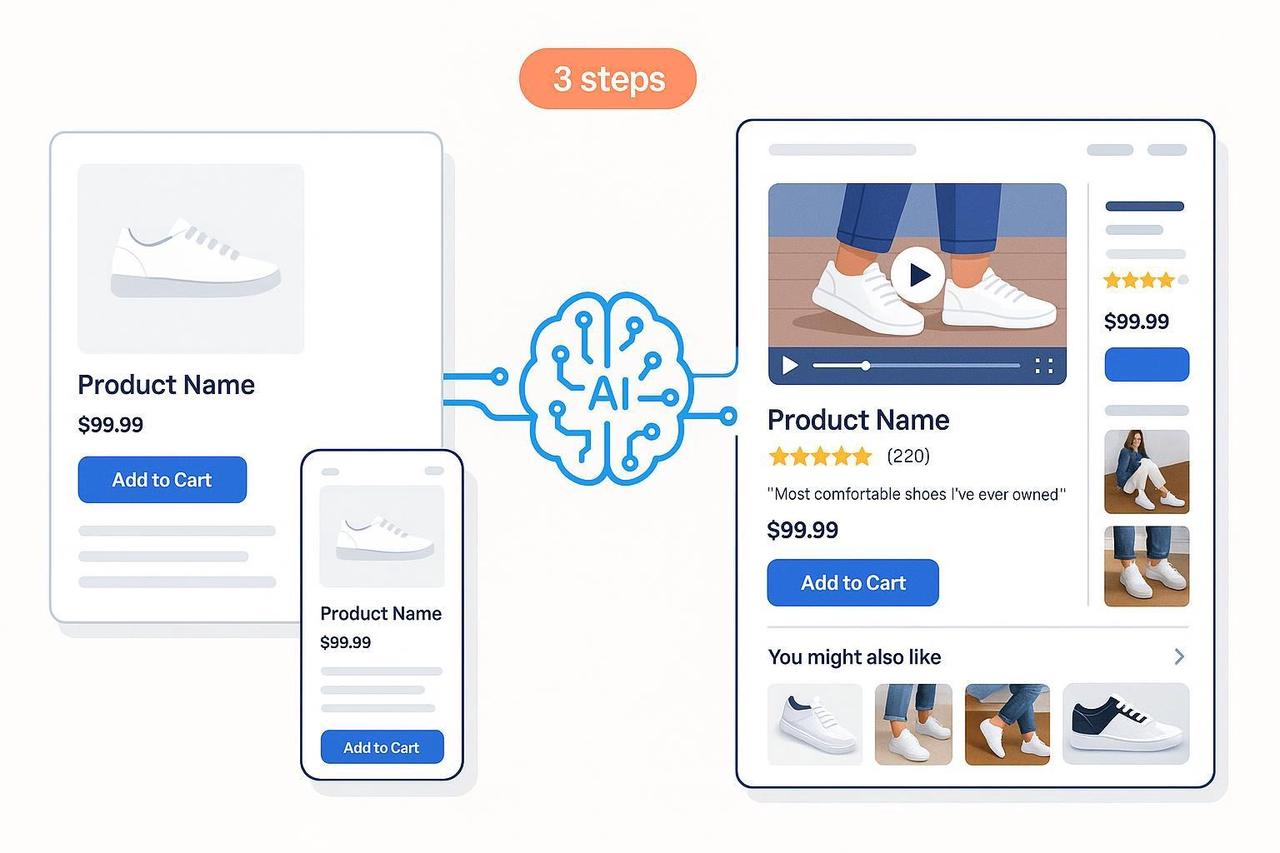
If your product pages (PDPs) feel flat, you’re losing money. Most “static” pages underperform because they lack living proof (video/UGC) and force shoppers to hunt for critical information. Your customers are scrolling past because they can’t see the product working.
It’s time to stop leaving revenue on the table. This guide gives you a practical, low-lift, three-step plan to move from static detail pages to high-converting pages. You’ll inject dynamic proof and personalization without needing heavy engineering—all starting with the power of a great product video template.
At a Glance
The Goal: Turn cold, technical product pages into warm, proof-driven conversion centers.
What you’ll achieve: Quickly add short product video, UGC, and personalization using a scalable workflow.
Estimated time: 1–2 working days for your first win, then rapid iteration.
Step 1: Diagnose the ‘Static’ Problem & Fix the Foundation
Before adding video, we need to fix the friction. Start by mapping your shopper’s anxieties to your content gaps.
Find the Friction Points
Pull your last few months of data to find the leaks:
Look at the drop-off: What is your current view-to-add-to-cart (ATC) rate?
Identify common exits: Are shoppers leaving due to missing specs, shipping uncertainty, or sizing confusion?
Check engagement: Where are people not clicking? (e.g., reviews tab, size guide).
Rewrite for Confidence (Use AI Safely)
Your copy must speak directly to the shopper’s core questions: Will it fit me? Is it high quality? How does it look in real life?
Use your AI creative buddy to draft benefit-led copy and FAQs—but always human QA it.
Suggested Prompt: You are a conversion-focused copywriter. Rewrite this product title, 5 bullets, and 5 concise FAQs using a friendly, benefit-led tone. Keep claims factual and grounded only in the provided data. Make the copy skimmable for mobile.
Bullets: 3–5 scannable benefits tied to outcomes (not just features).
FAQ: Pull from real support tickets and returns reasons. A quick win is adding 3–5 concise, high-intent FAQs near the “Add to cart” area.
Validate Your Hidden Proof (Schema)
To help your products show up in rich Google search results, ensure your page has the right metadata. Mark up your PDP with Product, AggregateRating, Review, and FAQ data. Follow Google’s guidance on Product structured data and validate your code.
Step 2: Swap Static Images for Dynamic Proof (The Video Win)
Video is the single biggest unlock for static pages. More than half of shoppers say online video helped them decide what to buy, according to Think with Google analysis.
Stop waiting for a full-scale video production. Start with product video templates designed for speed.
Create a 15–45s Mobile-First Video
The fastest way to get a video live is by starting with a template. Whether you use a Canva product video template, a Product video template CapCut, or a dedicated editor, follow this structure:
Hook in 3 seconds: Show the outcome or “wow” moment immediately.
Structure: Hook $\rightarrow$ problem/need $\rightarrow$ 2–3 proof shots $\rightarrow$ micro-CTA.
Don’t Forget: Always include captions. Many users watch muted.
Use Free Customizable Video Templates for Speed
You don’t need a huge budget. Whether you search for a product video template free download for Premiere, a Promotional video template CapCut, or an Product video Template After Effects, the key is rapid deployment and iteration.
Product video templates free the creative burden, allowing you to focus on getting the best raw footage and benefit-led copy.
Wyzowl’s 2025 dataset reports that 84% of people say a brand’s video convinced them to buy—use that proof!
Activate and Showcase UGC
Short video builds confidence, and social proof closes the deal. Users who engage with visual UGC and review modules see triple-digit conversion lifts according to PowerReviews 2021 study.
Reviews Module: Enable ratings/reviews with verified-buyer labels.
Visual UGC: Surface top customer photos/video in a small, tappable strip near the hero media.
Performance Watch-Outs: Always lazy-load below-the-fold videos and provide a lightweight poster image to keep your site fast.
Practical Example: Produce Video Variants with AI
If you’re ready to scale, this is where your AI creative buddy shines.
Using an AI editor like Nemo, you can upload raw demos and a short creative brief. The tool can then auto-select compelling shots, generate multiple aspect ratios (9:16, 1:1, 16:9), add captions, and export variants in bulk for different placements. NemoVideo is designed to streamline this workflow.
Step 3: Personalize and Optimize Continuously
Video and UGC are the new baseline. Personalization is the multiplier. McKinsey’s analysis reports typical revenue lifts of 5–25% from personalization programs.
Add Simple Personalization Blocks
Start with easy-to-implement rules:
“Fits with” or “Complete the look” recommendations.
Size guidance based on known brand-to-brand fit notes.
Contextual FAQs (e.g., show “Care & materials” to high-intent scrollers).
Instrument Analytics Properly (GA4)
You can’t optimize what you can’t measure. Ensure your ecommerce events are flowing (view_item, add_to_cart, purchase). For media and UGC, add custom interaction events like video_start/progress/complete and review_widget_click. Reference Google’s event specification for GA4 when mapping parameters in the GA4 events reference.
Run Controlled A/B Tests
Use your data to set up simple A/B tests:
Prioritize: Media order, video thumbnail, review highlights placement.
Define Success: PDP conversion rate, view-to-ATC, revenue per visitor.
Keep Pages Fast: Always monitor Core Web Vitals as you test.
Final Rollout Plan (7 Days to Dynamic)
Day | Goal | Action Item |
|---|---|---|
Day 1–2 | Baseline & Copy Fix | Capture baselines; add 3–5 high-intent FAQs; validate Product schema. |
Day 3–4 | Video & UGC Proof | Produce a 15–45s video using a product video template; embed near hero; optimize reviews/UGC strip. |
Day 5–7 | Measurement & Test | Instrument GA4 events (video plays/review clicks); launch 1 A/B test (e.g., thumbnail). |
Conclusion: Scale Your Creative Win
The era of static PDPs is over. By starting with product video templates (even a product video template powerpoint can be a start!), fixing your foundational copy, and leveraging AI for video creation and scaling, you empower your customer’s journey and drive measurable growth.
Ready to scale short product videos across many SKUs efficiently?
Give NemoVideo a try to automate the generation and export of multiple video variants.