

Creative Ops Tools 2025: Build Your Stack, Keep Your Sanity
You didn’t become a creative to manage spreadsheets, chase down “final_v4_REAL.mp4” files, or decipher vague email requests. But here you are.
In 2025, the difference between a burnt-out team and a high-performance studio isn't talent, it’s the stack. Creative ops tools are no longer just admin software; they are the nervous system of your brand.
This guide isn't a laundry list of apps. It’s a blueprint. We are breaking down the four essential pillars of a modern creative operations stack, showing you exactly how they fit together to stop the chaos and start the flow.
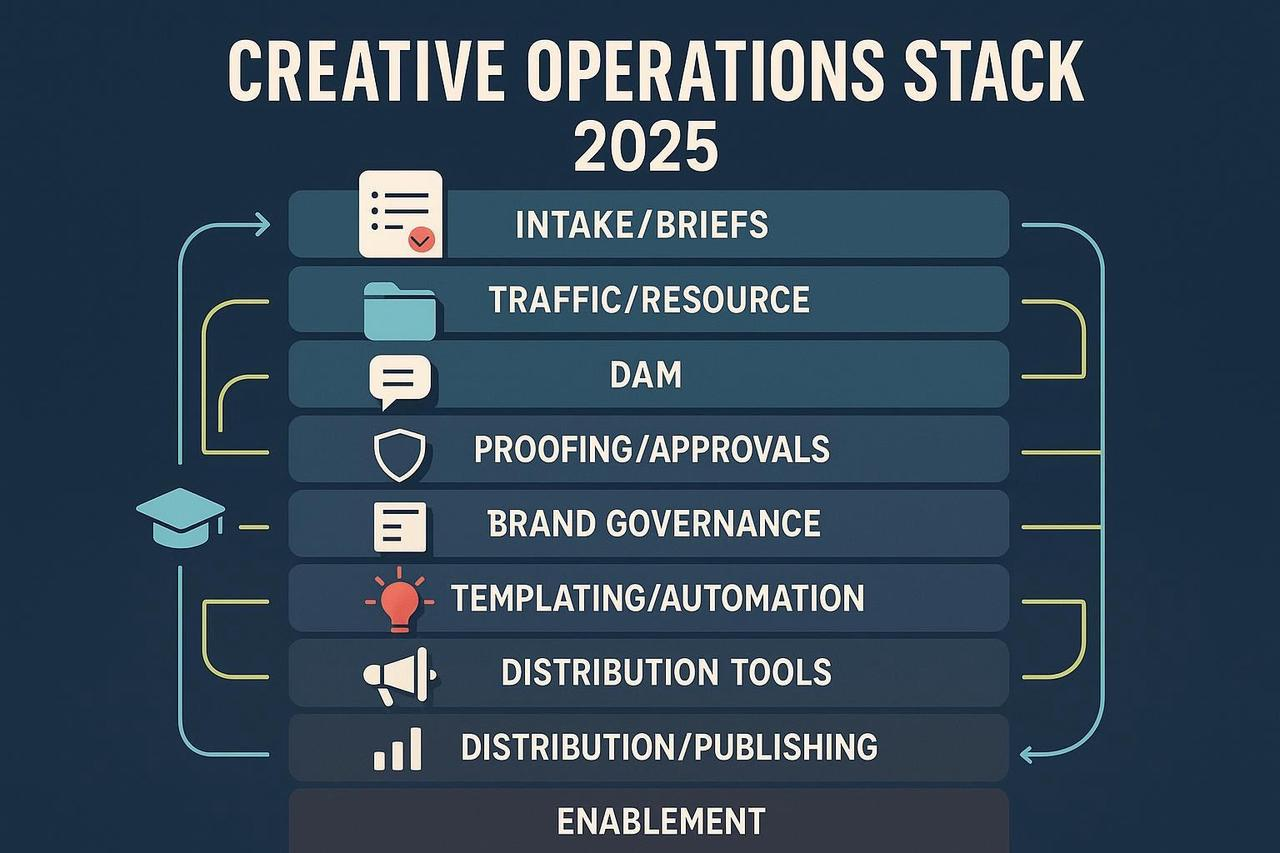
Pillar 1: The Foundation (Intake & Traffic)
Stop the "Hey, quick favor" DM.
If your requests come in via Slack, email, and hallway conversations, you have already lost. The first layer of your stack must be a rigid, unified front door.
Intake & Briefing
Purpose: Standardize the "ask" so you never start work without clarity.
What to look for: Dynamic forms that change based on the request type (e.g., a video request triggers fields for "aspect ratio" and "sound requirements").
Real-World Example: A marketing team uses Asana forms to route requests directly to a "Triage" project. If the "Budget Code" field is empty, the form won't submit. No more chasing finance approvals.
Pro Tip: Don't just build a form; build a contract. Follow Adobe’s creative brief guidance to ensure every request has a clear goal and audience before it hits your queue.
Resource Management
Purpose: See who is drowning and who has capacity.
What to look for: "Heatmap" views of your team's time. You need to see at a glance that your Senior Editor is booked 120% next week before you assign that new campaign.
KPI to Watch: Utilization Rate. Are your people working on billable creative, or just "busy"?
Pillar 2: The Asset Hub (DAM & Brand)
It’s not a folder. It’s a library.
If you are emailing files back and forth, you are wasting time and risking brand safety.
Digital Asset Management (DAM)
Purpose: A single source of truth. Searchable, taggable, and governable.
What to look for: AI-tagging and "Smart CDNs." You want to update an image in your DAM and have it automatically update on your website.
Real-World Example: A global retailer uses Brandfolder or Bynder. When their license for a specific model's photo expires, the DAM automatically unpublishes it from their e-commerce site, saving them a potential lawsuit.
Deep Dive: Effective metadata is the secret sauce here. Check out the metadata best practices to structure your library correctly.
Brand Governance
Purpose: Protect the identity.
What to look for: Portals that allow external partners (agencies, freelancers) to access only what they need, without emailing a zip file.
Pillar 3: The Execution (Production, Proofing & AI)
Where the work actually happens.
This is where 2025 looks vastly different from 2020. The integration of creative ops tools ai examples has shifted this from manual labor to strategic direction.
Online Proofing
Purpose: End the "email feedback loop of death."
What to look for: Frame-accurate video comments. You need to be able to draw on a specific frame at 00:14 and say "remove this coffee cup."
Real-World Example: Teams using Frame.io or Ziflow can stack versions on top of each other to compare changes instantly, cutting revision rounds by half.
AI & Intelligence: The New Force Multiplier
This is the biggest question we get: How does AI fit in?
FAQ: AI in Creative Ops
What are creative AI tools? These are tools that generate or edit content (Generative AI). Think Midjourney for ideation, Runway for video textures, or Nemo for editing. They act as "creative assistants."
What is the difference between AI and AIOps?
AI (Creative): Makes the work. It writes the script, edits the rough cut, or generates the background image.
AIOps (Operational): Manages the system. It’s the IT backbone that uses AI to monitor software health, predict server crashes, or automate file routing. Creative Ops teams rarely touch AIOps directly, but they benefit from the stability it provides.
How does AI contribute to creativity tools? It removes the "blank page" problem and automates the "drudgery." AI contributes by handling scaling, resizing, translation, and basic assembly, freeing humans to focus on strategy and emotion.
Production & Automation
Purpose: Scale without hiring 50 more people.
What to look for: Template locking. Allow your sales team to make a customized one-pager, but lock the logo and fonts so they can't break the brand.
Tool Spotlight: This is where NemoVideo shines. It’s not just an editor; it’s an operational lever. It allows you to turn one video into 20 localized variants in minutes, bridging the gap between high-end production and scalable volume.
Pillar 4: The Delivery & Loop (Distribution & Analytics)
Did it work?
Distribution
Purpose: Get assets to the "digital shelf" instantly.
What to look for: Integrations. Your DAM should push directly to your CMS (like WordPress) or social scheduler (like Hootsuite).
Compliance: Ensure you have digital rights management in place so you don't accidentally publish an asset with expired talent rights.
Analytics & The Feedback Loop
Purpose: Stop guessing.
What to look for: "Content Performance" metrics, not just "Team Efficiency" metrics.
Real-World Example: By tagging assets in the DAM with "humor" vs. "serious," a brand discovers that "humor" assets drive 20% more conversions. They feed this data back into the Intake phase to request more funny content.
Your 2025 Best Creative Ops Tools AI Checklist
Ready to upgrade? Here is your shortlist for the year.
Intake: Asana, Monday.com, or Airtable.
Asset Management: Brandfolder, Bynder, or Air.
Proofing: Frame.io (video), Ziflow (mixed media).
Creative Automation: Nemovideo AI Video Editor (for scalable video), Marq (for print/digital).
Generative AI: Midjourney (Image), ChatGPT (Copy), ElevenLabs (Voice).
Stop Managing Chaos. Start Designing Flow.
The goal of creative ops isn't to add more rules. It's to remove the friction that kills creativity.
When you have the right creative ops tools, you stop being the "logo police" or the "file chaser." You become the architect of a system that lets your team do what they were hired to do: Create.