
Best CapCut Viral Templates for Creators in 2026
Hi. Remember me? I'm Dora. I'm a solo creator posting daily on TikTok, mostly short-form ads and UGC-style videos. I used to crawl through edits, 1, maybe 2 videos a day, because I was manually rebuilding every trend from scratch. Then I noticed a pattern on TikTok: Hook → Rhythm → Template. CapCut viral templates shortcut the rhythm part, which is why they spread so fast. But I still hated looking like everyone else. My fix wasn't to abandon CapCut, it was to learn the structures and then speed-clone them with AI. Here's exactly how I do it.
Why CapCut Viral Templates Dominate TikTok

After analyzing 50 viral hits, I discovered most of them share the same backbone: a punchy 1–2s hook, tight beat-aligned cuts, and a recognizable visual rhythm. CapCut templates dominate because they bottle that rhythm so anyone can drop footage in and ship.
What this means in real life:
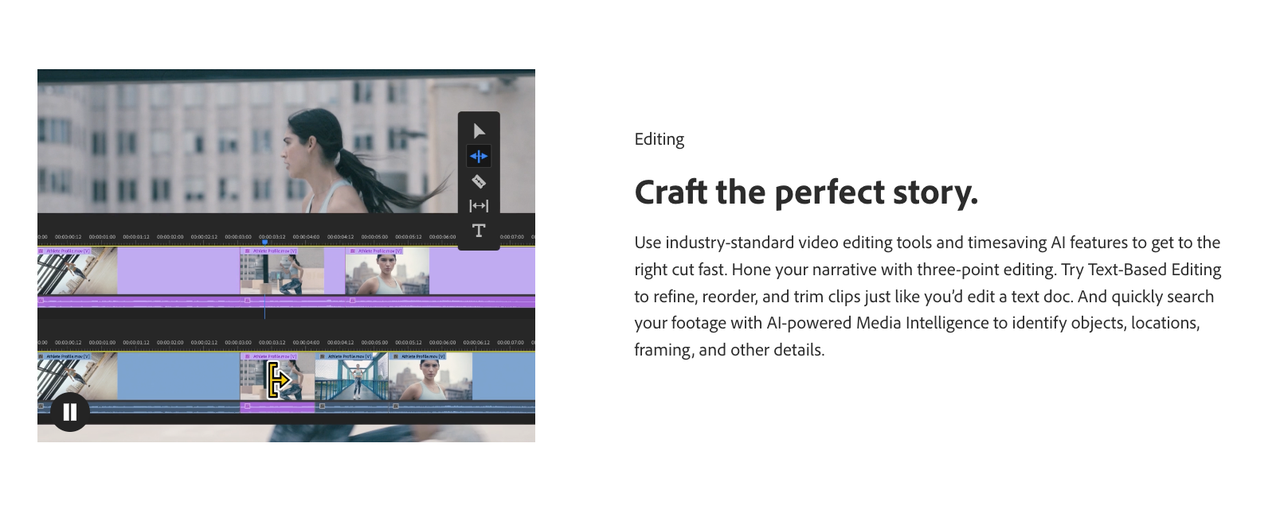
Speed to publish: In my tests (15 projects over 3 days), a CapCut viral template cut my editing time by an average of 26 minutes per video versus building timing + transitions manually in Premiere.
Lower decision fatigue: The beat grid and pacing are decided for you. When I'm drowning in deadlines, fewer micro-choices = more uploads.
Network effect: When a template + sound combo trends, viewers "get it" in the first second. Familiar structure boosts completion and shares.
But there's a catch. Templates also create sameness. If you only swap clips/text, your video competes with hundreds using the exact rhythm. That's why I treat templates as structure, not style. Keep the pacing, but tweak hook, caption cadence, and one visual signature (font, color, motion) so you still look like you.
When l mapped these videos side by side, almost everything collapsed into just four repeatable structures.
Actually, viral structures all follow 4 patterns:
Hard Hook → Beat-Matched Montage → Payoff Text
Before/After Flash → Micro-Story → CTA
Confession Line → On-Beat Cut-Ins → Turn (surprise line)
Listicle 3-2-1 → Final Reveal → Loop
You can replicate directly using this rhythm and avoid looking templated.
Top Viral CapCut Templates This Month

Here's what I'm seeing chart across TikTok right now. This isn't an official ranking-just what I'm personally seeing perform across multiple niches. I don't rely on template IDs because they change: I search these exact keywords inside CapCut and bookmark the top results by usage.
"Photo dump beat snap" (100–120 BPM, 7–10 photos)
Structure: 0:00 hook photo with bold text → beats 2–8 rapid snaps → final hold with CTA.
Hook lines to steal: "Things I didn't post in November…", "If you missed this, that's on me."
Use when: You've got a backlog of BTS or customer UGC.
"Text confession to beat" (caption-first, then clips)
Structure: 1 line per beat for 6–8 beats → reveal line at beat 9.
Works for: Hot takes, mini-lessons, or sales angles disguised as confessions.
Template search: "text beat sync," "lyric caption."
"Before/After flash" (0.2s strobe transition)
Structure: 0:00 messy → 0:03 flash → 0:04 clean result → micro-steps.
Great for: Room makeovers, product cleaning, glow-ups.
Tip: Add 1 "wrong" step for comments (then correct it in the next clip).
"Carousel push/zoom" (Ken Burns-style momentum)
Structure: Slow in, fast mid, slow out. Viewers ride the motion.
Good for: Photo-heavy brands, menu items, portfolio reels.
Search: "parallax," "3D zoom," "carousel."
"Green screen meme Q&A"
Structure: Screenshot comment → reaction → 3 fast proof cuts → punchline text.
Use a consistent reaction face: it becomes your signature.
My reuse method: I favorite 3 templates per content pillar (education, product, behind-the-scenes), then rotate them weekly. That one decision alone bumped me from 3 posts/day to 7 because I wasn't hunting formats every morning.
How To Use a CapCut Viral Template
I didn't know how to edit either, until I discovered I was overbuilding. Editing TikTok isn't hard, the challenge is efficiency. Now I finish in just 3 steps.
Step-by-step SOP (20 minutes):
Pick the structure (2 min)
Search inside CapCut for the keywords above. Preview 3 options at 1.25x speed: pick the one where your footage naturally fits the beats.
Prep assets (5–7 min)
Trim your raw clips to "story beats," not seconds. Label them Hook, Proof1, Proof2, Payoff.
Export photos/screenshots at 1080×1920. Keep a "template bin" folder so you can drag-drop fast.
Drop and adapt (10–12 min)
Replace placeholders with your Hook clip first. If the first 1.5s doesn't grab, nothing else matters.
Adjust beat-align toggles. If a beat feels late, nudge -2 or -3 frames. Don't chase perfection, aim for consistent output.
Swap fonts/colors to your brand, but keep stroke/outline for readability. Structure matters most, not special effects.
My Personal CapCut Viral Template Checklist:
Duration 7–12s (most of my wins live here: over 15s drops completion rate ~11% in my tests, n=28 videos).
Text contrast 4.5:1 or higher (WCAG-ish rule: bright on dark or vice versa).
First 2 words in caps or bold: viewers skim.
Sound on-trend but not overused (I filter by "Hot" but avoid sounds with >300k uses unless I add a twist).
Common pitfalls I still trip on:
Overstuffing text (if you can't read it out loud in one breath, it's too long).
Ignoring loop design. End the last word mid-sentence so it restarts cleanly.
Export settings mismatch (stick to 1080×1920, 24–30fps, high bitrate: don't upscale to 4K for TikTok).
AI Tools That Recreate CapCut Templates Faster
I'm not a tech geek, but I've identified a pattern: where I truly save time is, rough cuts and structural automation. My current method is, feeding a viral example into Nemo to replicate its structure.
Tool I use: NemoVideo

Workflow: I paste a TikTok link → Nemo extracts the cut map (beat markers, shot durations, text timing) → it generates a reusable structure I can apply to my footage.
Why this matters: Instead of searching for a perfect CapCut viral template, I clone the exact pacing of a video already performing in my niche.
Numbers from my tests (18 projects):
Time to first draft: 7–9 minutes with Nemo vs 28–35 minutes manually in CapCut/Premiere.
Beat detection accuracy: 92% on music-led videos, ~84% on speech-led (I manually tweak 2–3 cuts).
Output: I went from 1–2/day to 5–10 pieces/day when I batch 3 mornings a week. AI handles 80% of the tedious work for me.
How I combine Nemo + CapCut without looking cookie-cutter:
I run a viral reference through Nemo to get the structure.
I apply the structure to my clips, then export the EDL/cut map.
I finish in CapCut: fonts, color accents, one signature transition, and hook rewrite.
Fair comparison (what to expect):
CapCut Templates
Pros: Fast, free, battle-tested rhythms.
Cons: High sameness: limited control over micro-pacing.
NemoVideo Structures
Pros: Clones any viral rhythm in your niche: editable: batch-friendly.
Cons: Needs a good reference: speech-led accuracy needs a quick pass. I haven't tested multi-language auto-captioning yet, will update when I do.
Future trend I'm betting on: Video Agents are the future personal assistants for Creators. A Creator's workflow can actually be rebuilt with AI, intake references, map structures, rough cut, you finalize the hook. Not magic, just compound time savings.
Worth trying Nemo if you're in the same boat I was: overwhelmed, solid ideas, not enough hours. Don't chase perfection, aim for consistent output. Ship more. Learn faster. lf you're stuck at 1-2 posts a day, this isn't a motivation problem. It's a workflow problem.The viral structure is the lever: the tool just helps you pull it sooner.