

Molmo 2: Open-Source Video Grounding for Faster Editing
You've been there: scrubbing through a 20-minute interview, hunting for that one perfect soundbite. Or trying to count how many times your product appears on screen, losing track halfway through. It's tedious work that kills your momentum.
It is open-source models like Molmo 2 that are finally changing this reality. For independent creators and marketing teams, this unlocks workflows that previously required a dedicated team of editors to execute.
In this guide, we'll break down what makes video grounding different, explore real use cases, and show you how tools like NemoVideo are starting to integrate this intelligence into practical editing workflows.
What Is Molmo 2?
Developed by the Allen Institute for AI (Ai2), Molmo 2 is a state-of-the-art Vision-Language Model (VLM). While most AI models are kept behind closed doors by big tech companies, Molmo 2 is open-source under the Apache 2.0 license. This means developers and creators can use it freely to build their own tools without paying expensive licensing fees.
The Core Concept: "Video Grounding"
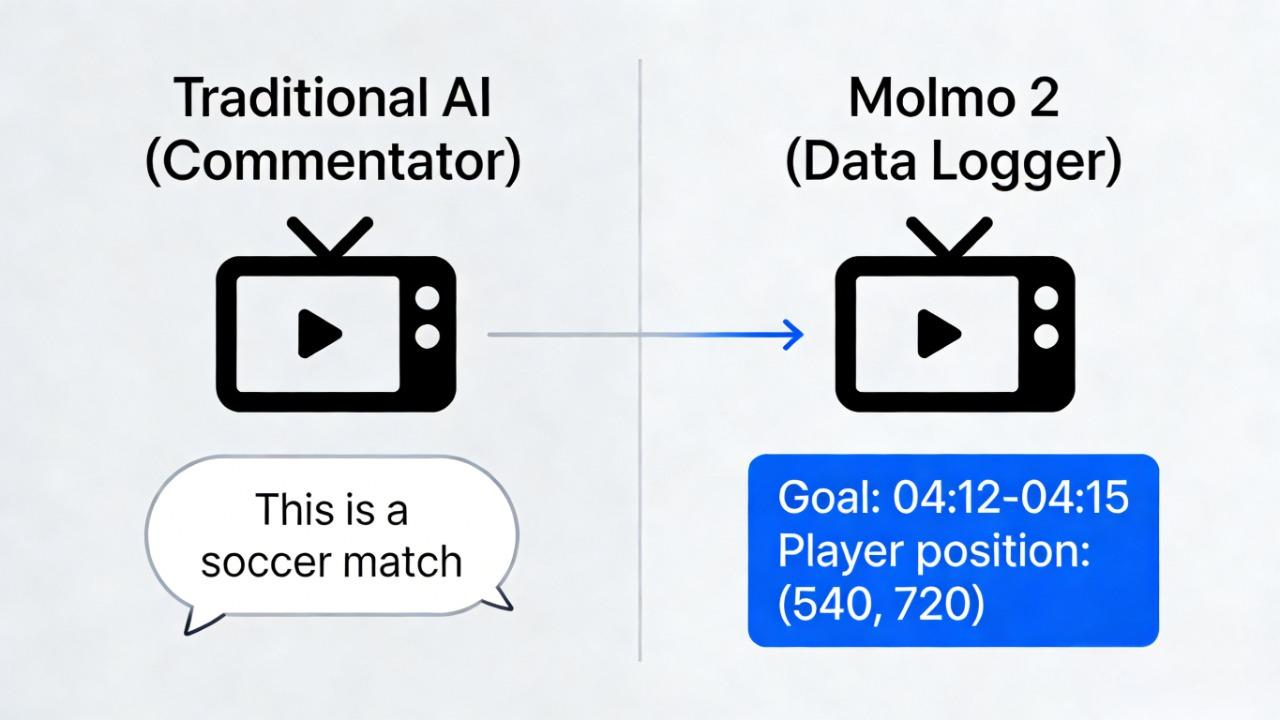
Most older AI models work like a casual observer. If you show them a video of a soccer game, they might say, "This is a match between two teams." That’s a description. It’s true, but it’s not very useful for editing.
Molmo 2 introduces Video Grounding. This means the model connects (or "grounds") its text to specific pixels and timestamps in the video.
Spatial Grounding: It can draw a box around a specific player on the field.
Temporal Grounding: It can tell you exactly when the goal happened (e.g., "Goal scored from 04:12 to 04:15").
How It Differs from Traditional AI
The key difference lies in utility. Traditional video AI operates like a "Commentator"—it generates a text summary of what it sees, which is great for search but useless for editing. You can't feed a text summary into Premiere Pro to make a cut.
Molmo 2 operates like a "Data Logger." Instead of just describing a scene, it outputs structured data: Timecodes and Coordinates. This shift is critical because editing software runs on numbers, not prose.
By providing the exact start/end times and pixel locations of actions, Molmo 2 allows automation tools to physically "cut" the video or "crop" a subject, effectively turning raw footage into a programmable asset.
Why Grounding Matters for Editing
Description Won't Tell You Where to Cut
When a description-only model analyzes your footage, it might say: "The presenter is holding a product and explaining its features." Accurate, but useless for editing. You still need to scrub through the timeline to find that moment, identify the exact frame where the product is most visible, and manually mark your in/out points.
Description answers "what happened." But editors need "where and when it happened."
This gap is why most AI video tools still require heavy manual intervention. The AI understands your content but can't point you to the exact moment you need. For creators producing 5-10 videos per week, this means the "AI assistant" still leaves you doing the tedious work—scrubbing, marking, cutting—over and over.
👉 This is exactly why NemoVideo integrates grounding intelligence—to eliminate the scrubbing loop.
What Grounding Adds to Your Workflow
Precise timestamps
Molmo 2 returns exact timestamps for events across a video. Ask "When does the speaker gesture?" and you get "0:23.4 seconds" instead of "sometime early in the video." This means you can automate clip extraction—query for key moments and jump straight to them instead of watching the entire timeline.
Spatial coordinates
Molmo 2 identifies precise pixel coordinates and object positions within frames. It knows not just that "a product appears," but exactly where: coordinates (540, 300) to (980, 720). This enables auto-cropping for vertical formats, tracking objects through demos, or applying focus effects without manual masking.
Why This Unlocks Real Automation
Traditional automation hits a ceiling without grounding. Grounding provides the spatial and temporal anchors that connect actions to frame-level timelines. This foundation enables:
Highlight detection that finds the actual peak moments, not just random clips
Object tracking that maintains focus across cuts and camera moves
Chapter generation with accurate timestamps, not rough estimates
Adaptive reframing that follows subjects as they move
Grounding transforms video AI from a describing tool into an editing partner.
For platforms like NemoVideo, this means the AI can make editorial calls—not just technical ones. Instead of "apply a transition here," the system asks "where does this visual peak occur?" and places the cut accordingly.
5 Creator-Ready Use Cases
Find Highlight Moments Automatically
We’ve all been there: staring at two hours of raw interview footage, knowing there’s a 30-second "gold nugget" hidden somewhere in the middle. Normally, you’d have to scrub through every minute manually. With Molmo 2’s temporal grounding, the model identifies exactly where and when events occur.
You can simply ask: "Find the moment the guest gets emotional while talking about their first business". Because the model understands fine-grained dynamic events, it can pinpoint the exact timestamps for you to extract.
Ideal for: Interviews, podcasts, demos, and vlogs.
The Nemo Advantage: This aligns perfectly with NemoVideo’s Inspiration Center, which helps you identify high-impact "Hooks" that grab attention in the first 3 seconds based on successful viral patterns.
👉 Learn NemoVideo's Inspiration Center
Generate Chapter Outlines + Timestamped Scripts
Manually typing out
[02:15] - Intro[04:45] - Technical SpecsBy providing structured data—timecodes and coordinates—the model allows for the automatic creation of logical chapter breaks and timestamped scripts.
Usefulness: This is essential for YouTube SEO, X (Twitter) threads, and educational content that needs to be easily searchable.
🚀 Stop manual timestamping. Let AI do the dirty work.
Track a Person or Object Across Frames (Focus / Blur / Consistency)
Spatial grounding allows Molmo 2 to "keep its eye on the prize". It identifies precise pixel coordinates and maintains consistent object identities even through occlusions or scene changes.
This persistent tracking enables:
Auto-Focus and Masking: Automatically keeping a subject sharp while blurring a messy background.
Visual Consistency: Ensuring that effects or crops follow a person perfectly throughout a demo or vlog.
The NemoVideo Connection: Use this with NemoVideo's Platform Intelligence to ensure your subject remains centered when auto-reframing 16:9 footage into 9:16 for TikTok.
Count Actions (Sports, Demos, Tutorials)
Grounding transforms visual movement into structured, countable data. Molmo 2 excels at "counting-by-pointing"—detecting and marking every instance of a specific action or object.
Practical Examples: In a fitness video, it can count repetitions of a push-up. In a product demo, it can count how many times a feature is used.
Relevant for: Fitness creators, sports highlights, and step-by-step tutorials.
Multi-Image Reasoning for Storyboard Continuity
Molmo 2 isn't limited to a single clip; it can reason across multiple images or live input streams simultaneously. This "multi-frame reasoning" is crucial for maintaining narrative continuity—ensuring that colors, lighting, and objects remain consistent from Scene A to Scene B.
For creators using NemoVideo’s SmartPick, this means the AI can help you select only the assets that visually "match" your storyboard, ensuring your final edit looks professional rather than a disjointed mess.
A Practical Workflow with NemoVideo
Think of it as a two-stage pipeline: Molmo 2 is the analyst who watches your footage and takes detailed notes. NemoVideo is the editor who executes based on those notes—cutting, styling, and packaging for delivery.
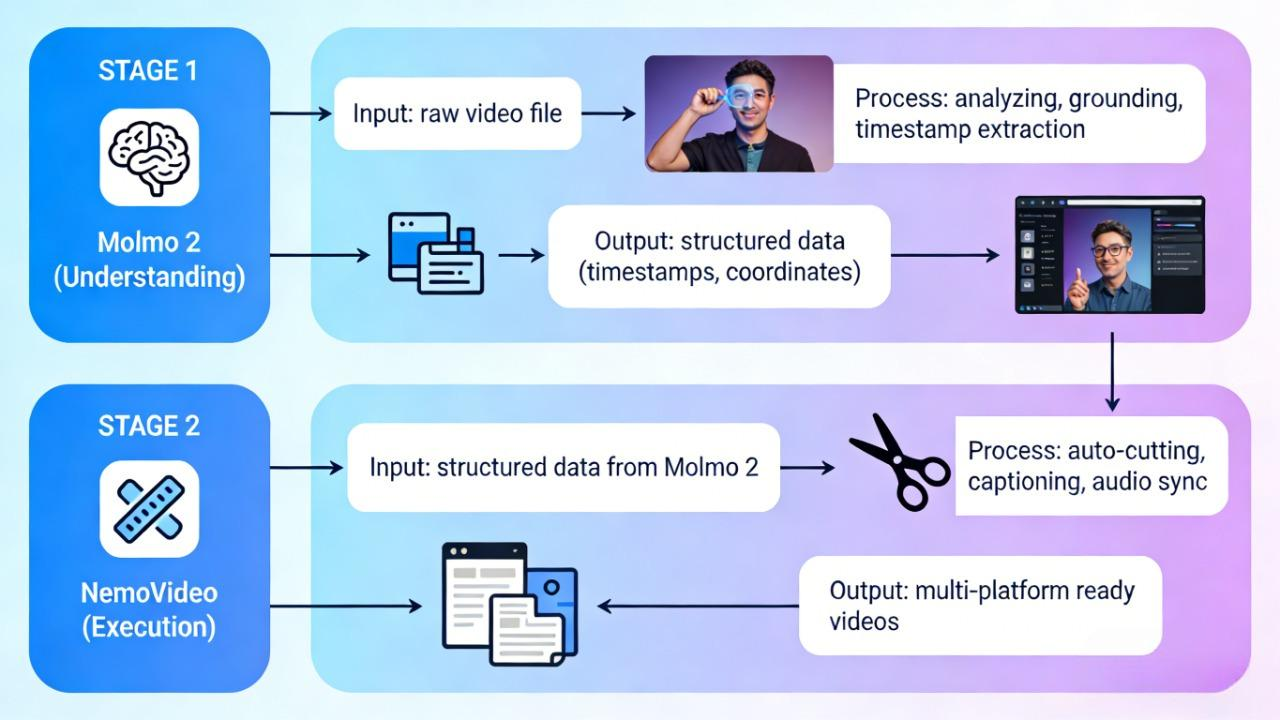
Molmo 2 handles understanding and grounding
Watches your footage and identifies what, where, and when things happen
Returns structured data: "Speaker gestures at 0:23 (coordinates 450, 780), product visible 1:12–2:45"
Provides timestamps for highlights, chapter breaks, and key moments
Tracks objects and assigns persistent IDs across frames
NemoVideo handles editing, generation, and publishing
Imports Molmo 2's timestamp data as edit markers
Auto-cuts clips at grounded moments
Applies SmartCaption synced to segments
Uses SmartAudio to match music to visual beats
Exports platform-optimized versions (9:16 TikTok, 4:5 Reels, 16:9 YouTube)
You don't need to run Molmo 2 directly. Tools like NemoVideo can integrate grounding capabilities under the hood, using the intelligence to make smarter auto-edit decisions. The grounded data becomes the foundation for features like SmartPick (finding the best clips) and Platform Intelligence (knowing where to crop for vertical formats).
⚡Start with your footage. Let NemoVideo handle the intelligence under the hood.
Where You Actually Spend Your Time
Step 1: Upload raw footage (30 seconds) Drop your video file into NemoVideo. Supports direct cloud import from Google Drive or Dropbox—no manual download/upload loop.
Step 2: Grounding analysis (automatic, 2–4 minutes) The system (powered by models like Molmo 2) analyzes your footage in the background. You'll get a notification when timestamps and segments are ready.
Step 3: Review suggested cuts (2 minutes) NemoVideo surfaces a list of grounded moments: "Speaker gestures at 0:23, Product visible 1:12–2:45, Energy peak at 4:37." Scan the list, approve the ones you want, delete any misses. This replaces 30 minutes of manual scrubbing.
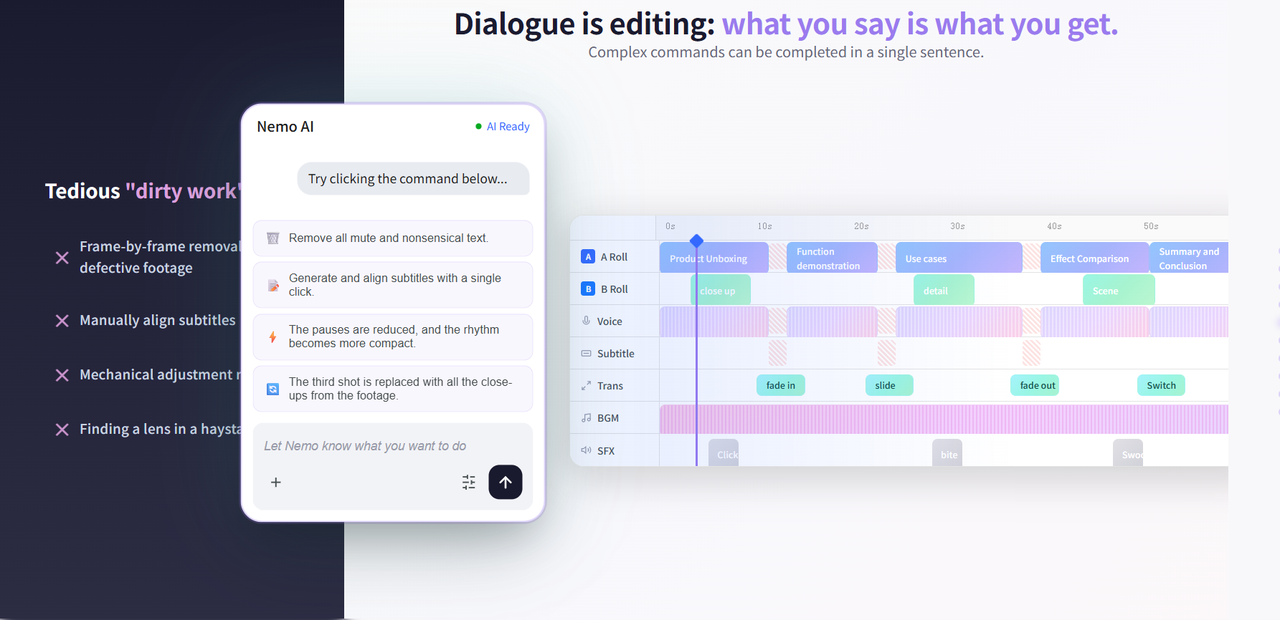
Step 4: Auto-edit with SmartPick (automatic, 1 minute) The editor cuts your approved segments, applies trending caption styles from Inspiration Center, and syncs SmartAudio to visual beats. You can preview the rough cut instantly.
Step 5: Fine-tune (optional) (3–5 minutes) Adjust caption timing, swap background music, or tweak the hook. This is where you add your creative fingerprint—but the tedious assembly work is done.
Step 6: Multi-platform export (automatic, 2 minutes) Export optimized versions for TikTok (9:16), Reels (4:5), and YouTube (16:9) in one click. Platform Intelligence handles cropping based on where subjects are grounded in the frame.
Total time: ~15 minutes (vs. 60–90 minutes traditional editing)
Reality Check: Test These Scenarios First
Video grounding is still hard, and no model yet reaches 40% accuracy on certain high-difficulty tasks. Despite Molmo 2 leading many closed-source models in video counting and localization, the technology is in a growth phase. Here's what to test with your actual footage before relying on full automation:
Cluttered scenes and referential ambiguity When your frame is busy, the AI might suffer from "referential ambiguity." Ask it to track an "eye" in a close-up shot, and it might target the entire "head" instead. Test this first if you shoot crowded environments, multi-person interviews, or complex product arrays. The clearer your subject separation, the better the results.
Low-resolution or unstable lighting Grounding precision drops significantly in low-res footage or environments with flickering lights, heavy shadows, or extreme contrast shifts. If you're working with user-generated content, old stock footage, or low-light shoots, run a test clip before committing to a full batch workflow. Clean, well-lit footage performs 2-3x better.
Recognition vs. reasoning AI excels at identifying "what is happening" but still lacks depth in understanding "why it is happening." It can spot a speaker gesturing, but it won't know if that gesture signals excitement or frustration. For content where context and intent drive your edits, expect to apply human judgment on top of the grounded data.
The practical approach: Start with your cleanest, most structured footage—product demos, talking-head interviews, tutorials with clear steps. Once you see how grounding performs on your typical content, you'll know where to trust automation and where to keep manual control.
🎬 Test smart. Scale what works. Start with NemoVideo's free trial
FAQ
What license does Molmo 2 use?
Molmo 2 is licensed under Apache 2.0 and is trained on third-party datasets that are subject to academic and non-commercial research use only. This means the model weights and code are open for research, but if you're using it in a commercial product, verify that your use case aligns with the dataset licensing restrictions. For most creator workflows—like testing grounding features or building proof-of-concept tools—this is permissive enough.
Are there multiple model variants?
Yes, three variants optimized for different needs:
Molmo 2 (8B): Qwen 3-based, the best overall model for video grounding and QA
Molmo 2 (4B): Also Qwen 3-based, optimized for efficiency
Molmo 2-O (7B): Built on Olmo, offering a fully open end-to-end model flow including the underlying LLM
If you're integrating grounding into a production tool, the 8B variant offers the best accuracy. If you need faster inference or are running on limited hardware, the 4B variant is your pick.
Do I need to run Molmo 2 directly to use grounding?
No. Unless you're a researcher or developer building custom pipelines, you won't interact with Molmo 2 directly. Platforms like NemoVideo integrate grounding capabilities under the hood—you upload your footage, and the system handles the analysis. The grounded data (timestamps, coordinates) powers features like SmartPick and Platform Intelligence without you needing to understand the model architecture. Think of it like using auto-focus on your phone camera—you benefit from technology without configuring the lens mechanics.
Is it suitable for commercial workflows?
Yes, with caveats. The Apache 2.0 license allows commercial use, but the training data restrictions mean you should consult legal guidance if building a paid product directly on Molmo 2. For creators using platforms like NemoVideo that integrate grounding capabilities, this is already handled—you're using a commercial tool that leverages the technology, not deploying the model yourself.
When can I try this in NemoVideo?
NemoVideo is actively exploring grounding integrations to enhance features like SmartPick (auto-selecting best clips), Platform Intelligence (smart cropping for vertical formats), and Inspiration Center (matching trending structures to your footage). To learn more about NemoVideo's features, visit www.nemovideo.com. You can sign up for free to test the platform and explore how AI-powered editing can accelerate your workflow.
🚀 Start your free trial at nemovideo.com — no credit card required, just pure creativity.