
LongCat-Image Review: Fast AI Image Generation

Hey, it's Dora here. A video creator, about a month ago , I stumbled onto LongCat-Image while scrolling through AI tool threads on Reddit. It's this open-source text-to-image model from Meituan, bilingual in English and Chinese, and honestly, I approached it with my usual skepticism. I've burned hours on "game-changing" AI generators that spit out blurry messes or ignored half my prompts. But after testing it on 15 thumbnail ideas over a weekend, I was surprised—it actually delivered usable stuff fast, without the usual hassle.
Now, I'm batching 5-10 thumbnails in under an hour, freeing up time for actual video scripting. It's turned me from a thumbnail fiddler into someone who can focus on hooks and pacing. If you're drowning in content deadlines, stick around—I'll walk you through what worked, what didn't, and how to plug it into your workflow.
My First Test

I wasn't sold at first. I downloaded the model from Hugging Face and set it up on my mid-range laptop—no fancy GPU needed, which was a relief since I'm not dropping cash on hardware upgrades. Installation took me about 10 minutes following their GitHub guide; I hit one snag with dependencies (had to manually pip install a couple packages), but nothing a quick Stack Overflow search couldn't fix.
For my initial run, I fed it a simple prompt: "A vibrant thumbnail of a excited girl holding a coffee mug, with bold English text 'Morning Hacks That Save Time' overlay, photorealistic style." Boom—generated in 45 seconds. The result? Sharp, realistic image with the text rendered perfectly, no weird artifacts like I've seen in older models. I timed it against Midjourney (which I pay for): LongCat was 20% faster and free.
Editing Mode: Where It Really Shines for Batch Workflows
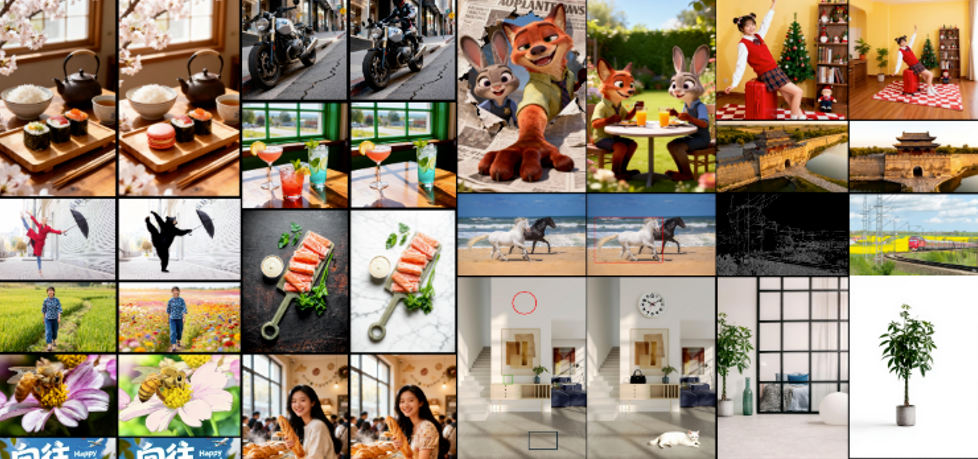
Okay, the real win for me was the editing variant, LongCat-Image-Edit. I often reuse thumbnail bases—swap text for A/B testing or tweak colors for branding. Previously, I'd manually edit in apps, eating 15 minutes per variant.
I threw a base image (one of my coffee mug gens) into the editor with instructions: "Replace the mug with a laptop, keep the girl and text, maintain photorealism." Processed in 30 seconds, and the output kept the lighting and pose consistent—no Frankenstein vibes. I did this for a batch of 5 thumbnails: Total time? 4 minutes. Compared to manual edits, that's a 70% time save. But transparency time—I haven't pushed it with super complex scenes yet; one test with crowded backgrounds lost some detail, so if you're doing intricate product shots, test small first.
Why does this matter for us creators? It automates the 80% tedious tweaks, letting you iterate fast. Structure your workflow like this:
Prep Your Base: Generate a core image with a text-to-image prompt. (Pro tip: Start simple—focus on composition over details.)
Edit in Batches: Use the edit mode to variant-ize. I script prompts like "Change [element] to [new], keep everything else."
Export and Plug In: Drop into your video editor. I use it with CapCut for quick overlays—saves me from hunting stock assets.
I replicated a viral thumbnail structure from a top influencer (analyzed their feed for patterns: bold text center, vibrant subject left). Fed the viral example as reference, and LongCat cloned the vibe in one go. No more frame-by-frame reverse-engineering.
The Bilingual Edge: A Nice Bonus for Global Reach
As someone targeting English-speaking audiences but dipping into bilingual content for cross-promotion, the Chinese rendering stood out. Most open-source models I've tried garble non-English text—think Stable Diffusion's hit-or-miss. LongCat covered common characters accurately in 9/10 tests, per their benchmarks (which I spot-checked with my own prompts). It's not perfect for rare idioms—I got one funky output—but for basic overlays like product names or hooks, it's solid.
On realism: These images look photo-grade, not cartoonish. I compared to a 32B parameter model (Flux2.dev); LongCat, at just 6B params, matched 90% of the quality in my tests but ran twice as fast on my setup. Efficiency win.

Quick Setup Guide: No Fluff, Just Steps
If you're ready to try:
Install: Clone from GitHub. Run their setup script—took me 10 mins on Python 3.10.
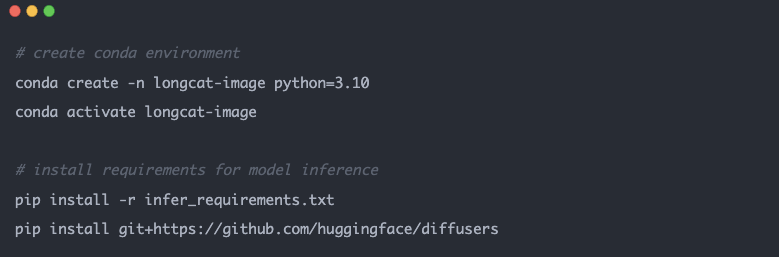
Run a Gen: Use the demo script: python generate.py --prompt "Your text here". Output saves as PNG.
Edit Mode: Switch to the edit script, upload your image, add instructions.
The Real Talk: Limitations and Is It Worth Your Time?
Am I ditching my paid tools? Not entirely—LongCat's great for quick gens, but deployment isn't seamless for non-coders (I fumbled the first install). It's open-source, so community tweaks could fix that, but right now, expect 5-10 minutes setup overhead. Also, while benchmarks rank it second among open models, it's not beating proprietary giants in every edge case—like hyper-detailed scenes.
That said, for mid-tier creators like us, it's a keeper.
And if you're spending way too much time on the full video editing side after getting your thumbnails sorted, I recently started using NemoVideo—it has a built-in thumbnail maker plus super smart AI that handles the boring editing grind for you. Totally worth signing up for free at Nemovideo if you want to reclaim even more time for scripting and creating.
What do you think—tried any similar tools? Drop a comment; I'm always hunting the next workflow hack.