
The Search for the Ultimate All in One Video Editor: Balancing Automation with Creative Control
If you are searching for an all in one video editor that balances speed with creative freedom, the choice depends on where your bottleneck lies. For creators who need granular control over every frame and effect, traditional timeline editors like PowerDirector remain a strong standard. However, for teams focused on performance and scale, AI-first platforms like Nemo (AI Video Editor) have standardized a new workflow.
Instead of manually tweaking every cut, NemoVideo automates the repetitive "grunt work"—like bulk resizing and pacing—allowing creators to focus purely on the story and strategy rather than technical timelines.

The New Standard for Video Workflow
The modern digital landscape demands more than just "editing"; it demands a complete video creation solution. Whether you are a solo creator or an agency, the pressure to produce high-volume, high-quality content is relentless.
Moving Beyond the "Timeline Trap"
Traditional editing is linear. You import footage, cut, add transitions, and export. This works for one-off projects, but it breaks down when you need 50 variants for a campaign by Friday. This is where the concept of an essential video tool shifts.
Traditional Method: Manually duplicating project files to change one text overlay for A/B testing.
The AI Approach: Platforms like NemoVideo utilize "generative workflows." You define the creative intent once, and the system intelligently generates multiple iterations—tailored for different aspect ratios or audience segments—instantly.
This shift allows you to maximize efficiency by removing the friction of mechanical tasks. When your software handles the technical specifications, your brain is free to focus on the creative hook.
Ensuring Compliance and Quality at Scale
One of the biggest hidden time-sinks for creators is navigating platform rules. A robust all in one video editor shouldn't just cut video; it should help you navigate the ecosystem.
For example, when producing commercial assets, you aren't just editing visuals; you are managing rights and regulations.
Audio Safety: You need to ensure your backing tracks are cleared for ad use, similar to checking the Commercial Music Library (TikTok Ads Help).
Ad Formats: Creating content for specific placements, like TikTok Auction In‑Feed Ads (TikTok Ads Help), requires exact pacing and formatting that manual editing often misses.
Creative Standards: To ensure your content performs, it must align with Creative best practices (TikTok Ads Help). Modern AI tools integrate these "safe zones" and pacing guides directly into the generation process.

Deep Dive: Automation vs. Control
Why do creators feel they have to choose between AI and control? Usually, it's because early AI tools were "black boxes." Today, the best tools act as a "Creative Buddy."
NemoVideo is designed to sit in the middle. It automates the tedious parts—like ensuring your video acts as a proper Promoting a brand, product, or service (TikTok Support) asset—while leaving the final creative decisions to you. This is crucial for maintaining compliance with regulations like the FTC Endorsement Guides: What People are Asking, where human oversight on disclosure is mandatory.
Furthermore, accessibility is no longer optional. Just as you consult guides on Accessibility for watching videos (TikTok Support), your editor should automatically suggest captions and high-contrast text to ensure your creator content reaches everyone.
Comparison: Nemo Video vs. PowerDirector
Feature | Nemo Video (The AI Creative Buddy) | PowerDirector (The Traditional Workhorse) |
Core Philosophy | All in one video editor for automation & scale. "Creativity First, Tools Second." | Desktop NLE focused on granular timeline control and effects. |
Bulk Creation | Native bulk A/B variant generation for testing. | Manual duplication of timelines required. |
Creative Control | Strategic control (Style, Pace, Message) via AI prompts. | Pixel-level control (Keyframes, Masks) via manual tools. |
Best For | Scaling ads, social content, and Split test best practices (TikTok Ads Help). | Long-form documentaries, complex VFX, and hobbyist editing. |
Collaboration | Cloud-native; designed for real-time team feedback. | Primarily asynchronous file sharing. |
Short-Form Focus | Auto-reframing and viral pacing baked in. | Requires manual setup of aspect ratios (9:16). |
The Tech Behind the "Zero-Frustration" Workflow
How does an AI editor actually work to maximize efficiency?
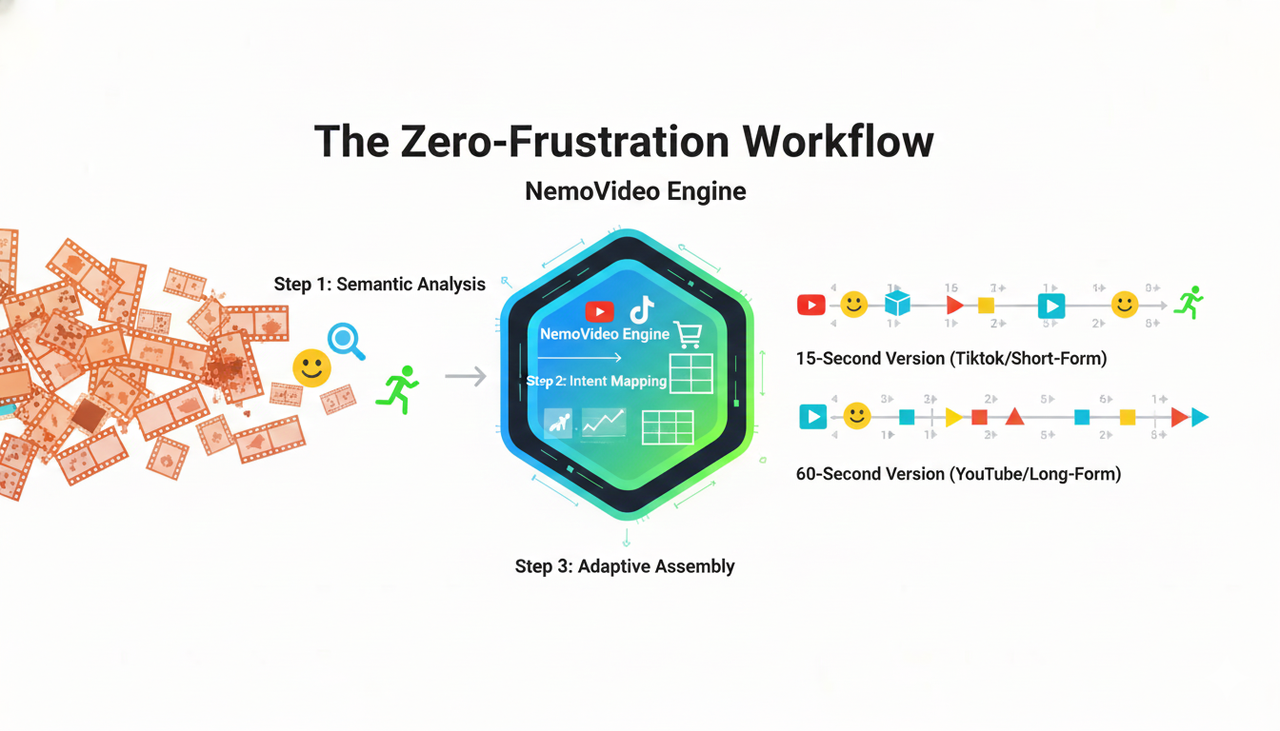
It starts by analyzing the raw footage not just as pixels, but as content.
Semantic Analysis: NemoVideo scans your uploads to identify key visual moments—smiles, product close-ups, or action shots.
Intent Mapping: It matches these moments against the structure of top-performing content type online.
Adaptive Assembly: Instead of a static timeline, the engine assembles the video dynamically. If you need a 15-second version for ikTok Auction In‑Feed Ads and a 60-second version for YouTube, the AI rearranges the clips to fit the time constraints without losing the narrative arc.
This process ensures that your creator content is always optimized for the platform, whether you are following Creative best practices or testing new hooks.
Frequently Asked Questions
Q: Can I really get creative control with an AI editor?
A: Yes. The definition of control shifts from "moving clips manually" to "directing the outcome." With tools like NemoVideo, you control the mood, the pacing, and the key message, while the AI executes the cuts. This gives you more mental space to ensure your content meets high standards, such as complying with FTC Endorsement Guides: What People are Asking regarding ad disclosures.
Q: Is it safe to use commercial music in these editors?
A: Most reputable all in one video editor platforms provide stock libraries. However, always cross-reference with platform-specific resources like the Commercial Music Library to ensure your specific use case (e.g., paid ads vs. organic) is covered.
Q: How does this help with accessibility?
A: Modern AI editors auto-generate captions, which is vital. Following guidelines for Accessibility for watching videos helps expand your audience reach and is often favored by platform algorithms.
Q: Why is bulk versioning important for creators?
A: To find a winning video, you need to test. Adhering to Split test best practices requires testing different hooks and visuals. AI editors generate these variants instantly, whereas traditional editors require hours of manual work.