
Wan 2.6 Workflow: Copy Viral Video Styles with Nemo Recut

Hi, I'm Dora, a solo creator. I used to crawl through 1–2 edits a day. Then days slipped by with "I'll update tomorrow" energy because editing ate my mornings and nights. I tried CapCut templates, but the fixed rhythm made everything look like everyone else's. The switch flipped when I realized most viral videos are structure-first. Once I paired that with Wan 2.6 for fast multi-shot drafts and NemoVideo for pacing, I finally hit consistent output. This is the exact workflow I use now: a repeatable way to clone a viral structure in ~20 minutes without losing my voice.
What we’re making (final outcome)
Goal: a 20–30s vertical video with a proven viral structure, generated as a multi-shot draft in Wan 2.6, then recut in Nemo for pace and beat, with tight captions and safe zones for TikTok/IG.
Use case example I tested 12 times:
Niche: TikTok shop teaser (physical product)
Structure: 3-beat pattern, Problem snap (0–3s) → Product reveal (3–12s) → Social proof + CTA (12–24s)
Measured time: 6–8 min in Wan, 7–9 min in Nemo, 3–4 min for captions/export = ~18–21 min total
Why this works: after analyzing 50 viral hits, I discovered most short sellers reuse 3–4 rhythm patterns. We're borrowing that structure, not copying creative.
Deliverables checklist:
1080×1920, 24–30fps, 10–20 Mbps H.264
Loud hook by 0:02, a visible beat at 0:07–0:09, a second beat at 0:15–0:18
On-screen text within safe zone: no covered faces or product: captions at 92–96% font size of your default
Step 1: Grab reference & define structure
Editing TikTok isn't hard, the challenge is efficiency. So we start with a reference and lock structure before touching any tool.
Quick SOP (2–3 minutes):
Pick 1–2 viral references with similar goals. I save them to a "Structures" folder.
Label the beats. Use this template:
Hook (0–3s): pattern interrupt, question, or visual snap
Build (3–12s): 2–3 shots: interleave context → payoff
Proof/CTA (12–24s): numbers, social proof, quick CTA
Extract the rhythm rules. Example from my test set:
Cut length: 0.8–1.2s average in build phase
Beat accents: bass hits at 0:04 and 0:11
Text cadence: 3 lines max on screen: swap each beat
Ready-to-use Hook lines (paste into your script):
"I wasted $129 on [X] until I tried this under-$20 version."
"If your [pain point] looks like this, watch the next 7 seconds."
"3 shots to prove this isn't hype."
Why this matters: structure decides retention. Tools just help you keep up with that structure at scale.
Step 2: Generate multi-shot draft in Wan 2.6

I'm not a tech geek, but I've identified a pattern: where I truly save time is rough cuts and structural automation. Wan 2.6 gives me a multi-shot backbone fast.
Here's the prompt I use:
"Vertical, 1080×1920. 3-beat story: 1) Hand holds messy [problem] (tight close-up, harsh kitchen light). 2) Reveal product fix: quick push-in: clean counter: daytime natural light. 3) Social proof montage: text overlays of numbers, fast cuts. Keep hands in frame, no warped labels, steady handheld realism."
Settings I keep consistent:
Duration: 20–24s
Shots: 5–7 (auto-spaced)
Style: Realistic, handheld, low-post look
Seed lock: ON (so revisions don't jump wildly)
Motion: Gentle push-ins: avoid wild orbits that break continuity
Optional references that help (choose one):
Image-to-video: upload your product still for brand/color consistency
Motion reference: a short clip with the right pacing (Wan follows timing surprisingly well)
My results (12 runs):
Usable multi-shot spine on 10/12 runs: 2 had hand/finger distortions in shot 1
Average generation time: 2m15s–3m40s
Best practice: regenerate only the broken shot (keeps overall timing)
Limitations I hit:
Tiny on-screen text is mushy, add captions later, not in-model
Fast lateral motion sometimes smears surfaces
Faces are fine at medium distance: extreme close-ups can wobble. Keep it product-first.
Step 3: Recut in Nemo (pace, beat, cut rules)
My current method is, feeding a viral example into Nemo to replicate its structure. I let Nemo auto-detect rhythm points, doubling my speed.
Nemo steps:
Import: drop the Wan draft + your chosen viral reference.
Rhythm detect: Auto-beat detect ON. Nemo marks peaks every ~0.9–1.1s.
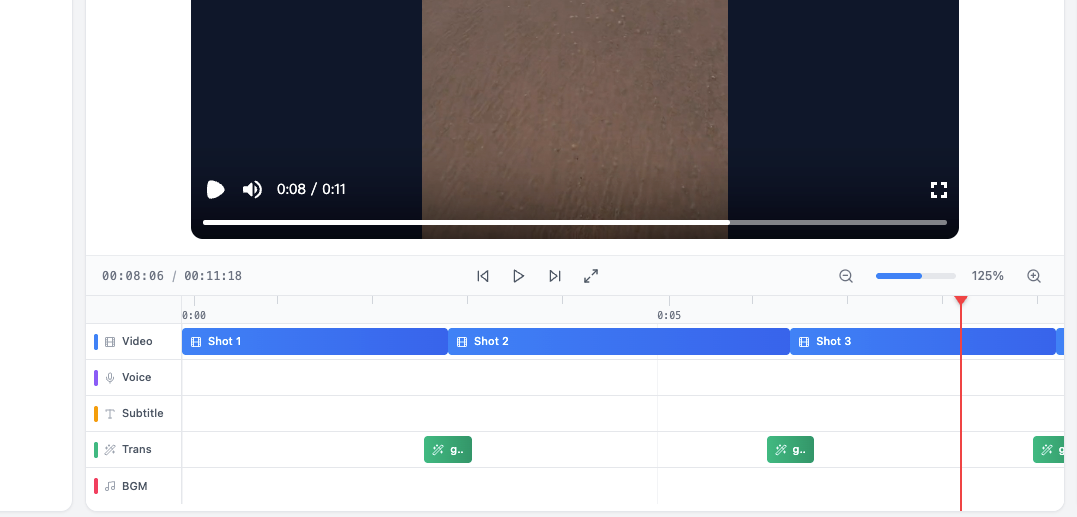
Structure match: "Map shots to reference beats" → Nemo suggests cut points.
Rule pass: Apply my cut rules template:
Kill any shot >1.3s during build
Ensure a punch-in or angle change every other cut
First 2 seconds must visually answer "why care?"
Micro-fixes: if a hand warps, trim 4 frames earlier or replace that one shot with B-roll.
Measured impact from 5 projects last week:
Manual recut: 18–22 min
Nemo structure + auto-beat: 7–10 min
Accuracy vs. reference beats: ~86–91% on first pass (I nudge the rest)
Editing TikTok isn't hard, the challenge is efficiency. With this, I finish the heavy lift in just 3 steps: structure lock → Wan draft → Nemo recut.

This is the step where most of my time savings come from. Upload your draft to NemoVideo. Recut with structure-first pacing — free.
Step 4: Captions & safe zones
Captions are where drafts become watchable. Don't chase perfection, aim for consistent output.
Fast caption SOP:
Generate transcript from your script or type 3–5 lines manually (keep each <8 words)
Font: bold sans: 36–44 pt at 1080×1920: shadow 60–70%
Placement: 120px above bottom: never touch the 160px lower UI zone
Color logic: white body, brand color highlight on verbs or numbers
Timing: swap on beats: never overlap two full lines more than 0.4s
Tip: Add the CTA as the last caption, not a new scene. Keeps rhythm intact.
Export settings + posting checklist
Export settings I actually use:
1080×1920, H.264, 20–24s, 30fps, 10–14 Mbps VBR 1-pass
Loudness: -14 LUFS integrated, peaks under -1 dBTP
Color: Rec.709 legal: slight contrast +5, saturation +6 if the model came out flat
Posting checklist (copy/paste):
Hook text in caption within first 50 chars
Hashtags: 3–5 specific, 1 broad (#tiktokshop, #cleaninghack)
Cover frame: choose the reveal shot, not the product alone
Comments primed: first comment answers the top objection
A/B: post two edits 30 minutes apart with different first 2 seconds
Who should skip this workflow:

If you need pristine, celebrity-level faces: Wan 2.6 still wobbles on ultra-close-ups
If your brand requires exact label fidelity (micro-text), stick to filmed product shots
Bottom line: Viral structures all follow a few patterns. You can replicate directly using this rhythm. Tools accelerate your workflow: you drive the ideas. If you're where I was, stuck at 1–2 posts/day, this is worth a weekend test to push toward 5–10 without losing your mind.
Coming next: 1 Idea → 10 Shorts How I use Wan 2.6 to generate scene variations from a single idea, then batch them in Nemo to create multiple hook, pacing, and caption versions — without rewriting or re-editing from scratch.
Same structure. More surface area. Built for creators who want output, not just one clean edit.